Why the Model Context Protocol Does Not Work

A reality check on MCP, Function Calling, and the challenges of connecting LLMs to the external world.
You may have heard that "MCP is like a USB for connecting AI to external systems." But does this really work for typical users, or do they see it as a fundamentally flawed piece of tech? Let's find out.
Just for context, I'm a full-stack developer working on generative apps, including AI workflows, agents, and multi-agentic systems. I create MCP Servers and a quite advanced LLM Client that supports the protocol almost completely. Lastly, I'm a user of the MCPs, and every day I use a couple dozen tools.
This article presents my perspective on the Model Context Protocol and aims to serve as a reality check that sets aside marketing claims, idealized visions of the future that may never materialize, and all those "imagine that your agent..." scenarios.
This time, there will be no imagination, but facts.
Function Calling / Tool Use
Foundation models can process multimodal content, including text, images, audio, and video, but they lack the physical ability to directly interact with the external world. However, they can generate JSON payloads that can be parsed and used in API calls to either fetch new information or perform specified actions.
So technically, a language model receives a system instruction with a list of available tools, including their descriptions and schemas for all possible actions.
Therefore, whenever a user asks the AI to perform a task that requires using a tool, the LLM generates a JSON string that the application uses to make an API call (or run local function). The results of these actions are then added to the context, so the LLM "believes" it has actually completed the task and can either perform another action or decide to contact the user and write the final answer.
This is what we call "Function Calling" or "Tool Use".
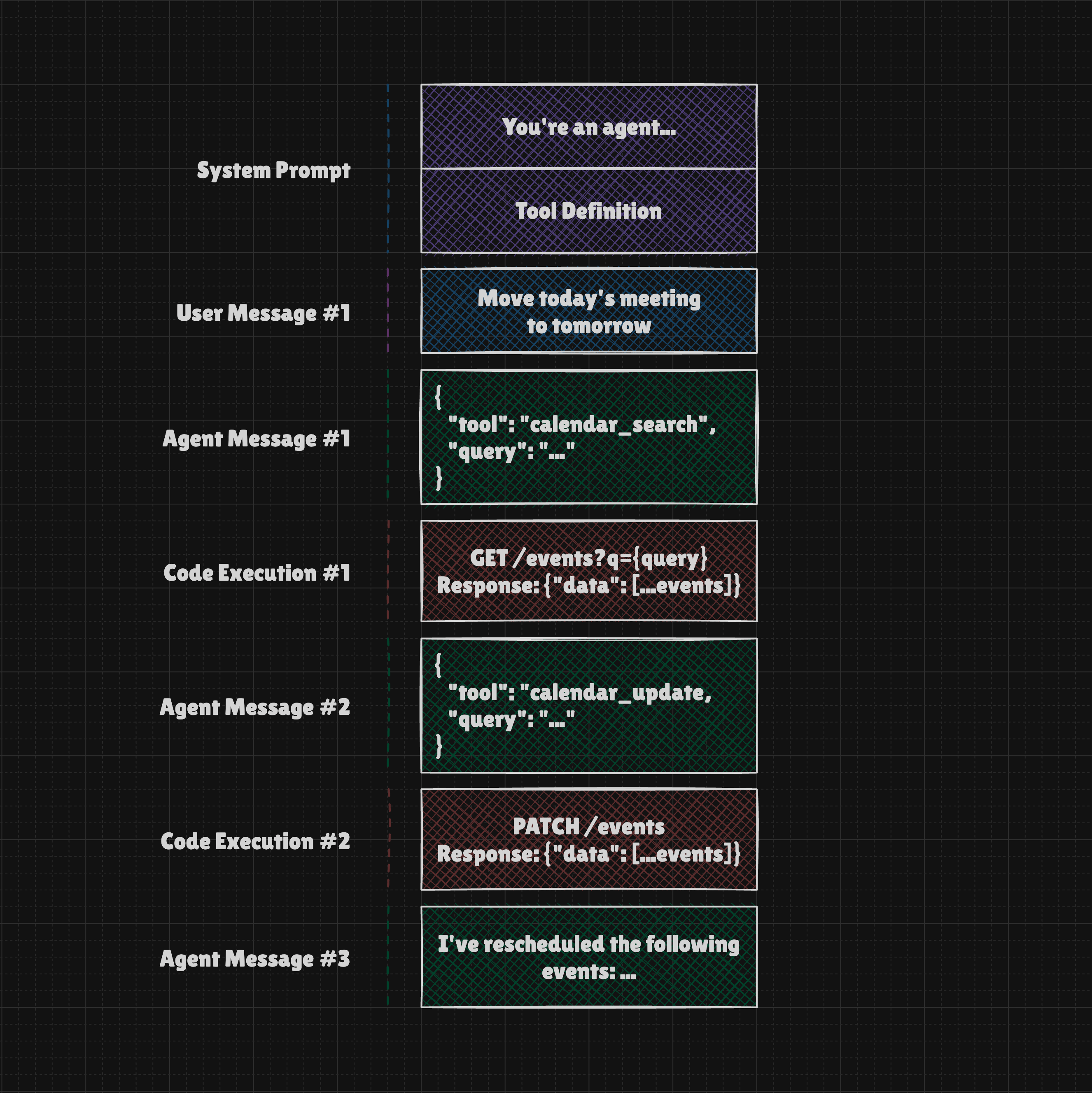
In the example above, the System Prompt instructed the LLM that it is an agent with access to a calendar, based on the tool definition included in the prompt. When the user asked to reschedule all meetings for the current week, the LLM first used the "search" action to find the calendar entries and then another action to update them. Finally, it confirmed the action to the user in a way that made it sound as if the agent had actually performed it.
Such example shows us a general concept of making language model interact with external world. Just keep in mind such interaction may be much more advanced, include multiple turns, gathering additional information, error recovery or even involving multiple AI agents that collectively work on the given objective.
Unified interface for tools and more
Connecting an external API to your app (that uses LLM) can be done in many ways, but it always requires you to write logic to manage the connection. In other words, there's no simple way to let users link their apps and services without building a dedicated integration.
Below is a simple schema illustrating the logic required to connect to an external API using Function Calling, which is a feature of the LLM API. Function Calling requires us to define a JSON Schema that describes the available actions, as well as the actual executor functions that will be triggered when the LLM decides to use a given tool.
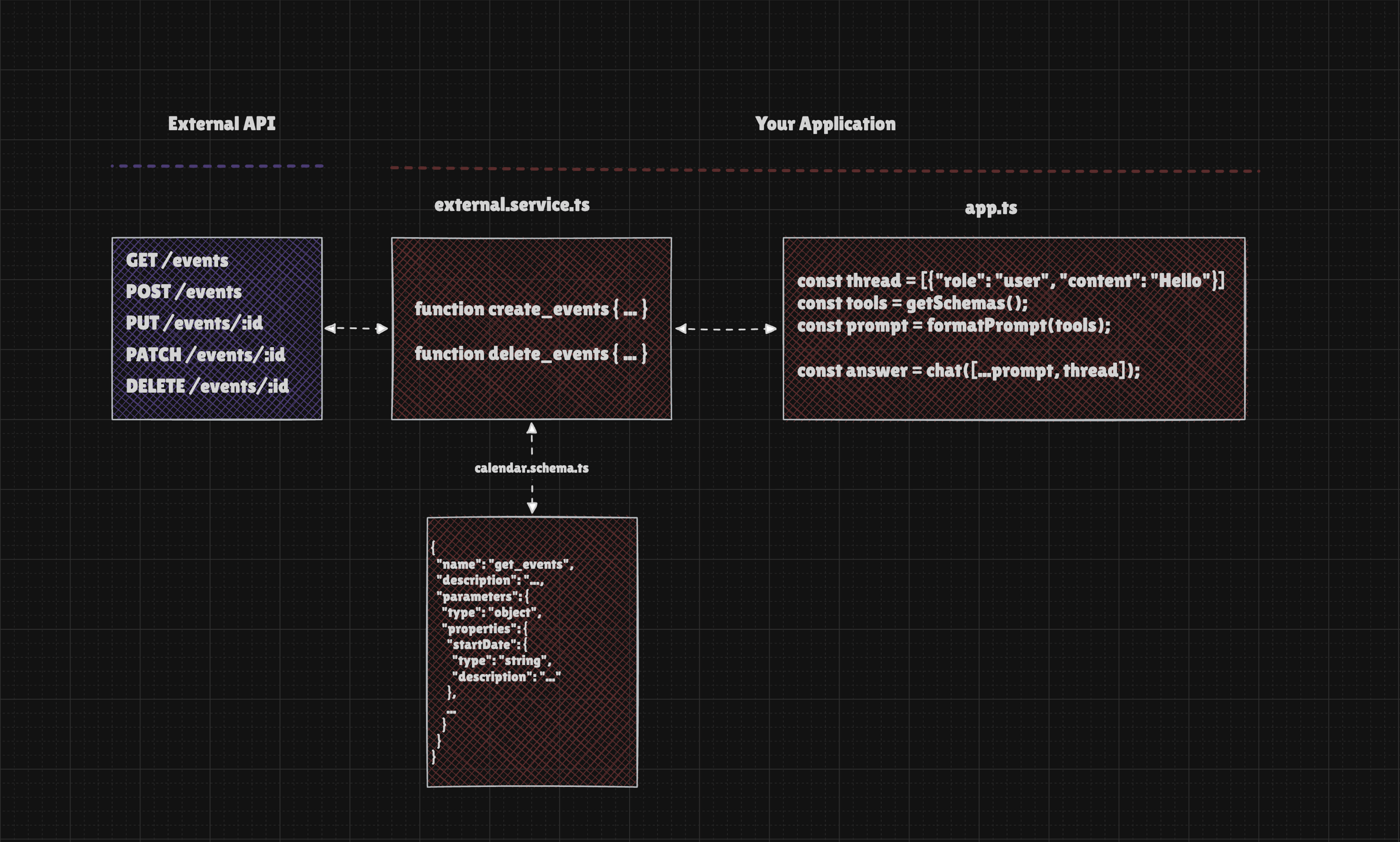
That was the case until now, as this exact challenge is addressed by the Model Context Protocol.
The MCP Server provides a list of tools (schemas) and offers the option to call their executors. This approach allows our core logic to remain unchanged, enabling us to easily connect additional servers to expand our app's capabilities.
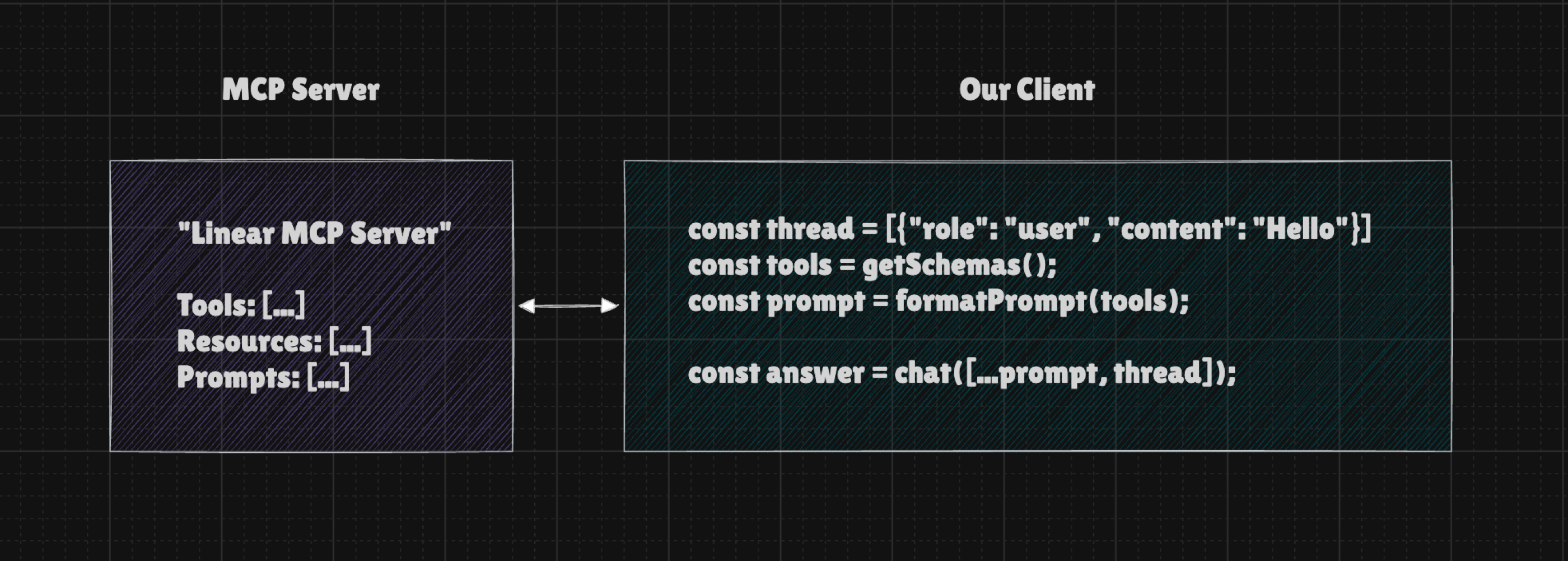
Simpler, right? Just keep in mind that it is mostly function calling under the hood.
Now, adding servers can be managed through the code, or you can provide a user interface that lets end-users add the MCP servers they need. Since the interface for all tools is unified, there's no additional work required on your end. It will simply work.
At this point, I think we're on the same page regarding the general concept of the Model Context Protocol and the problem it aims to solve.
Now, we are ready to look closer.
General limitations of Large Language Models
The utility of MCP servers is closely tied to what LLMs can and cannot do. While some limitations are well known or easy to spot, others are less obvious, so we should go over them now.
Context Window Limit
Large Language Models interpret all information as units called "tokens". When they "speak", they produce one token at a time, considering both the tokens provided as input and those generated up to that point. The amount of tokens they can process at once is limited, and this is called the "Context Window Limit".
Let's say we have a simple chatbot that can access the MCP Server, allowing it to interact with the browser. Every time we send a message, the LLM sees something like this:
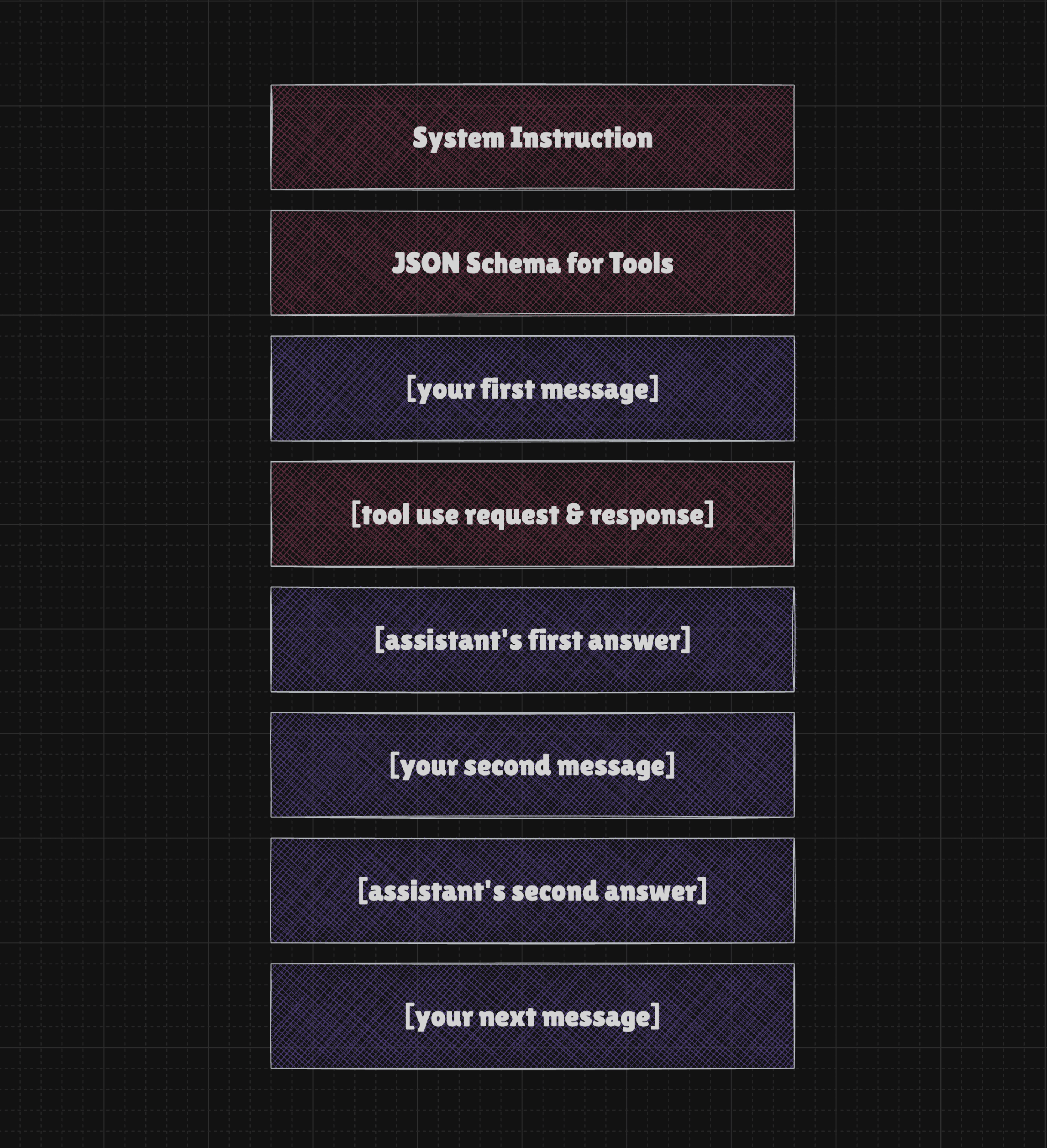
In practice, it often looks more like this, so System Instructions and Tool Definitions take up much more context the moment the conversation starts.
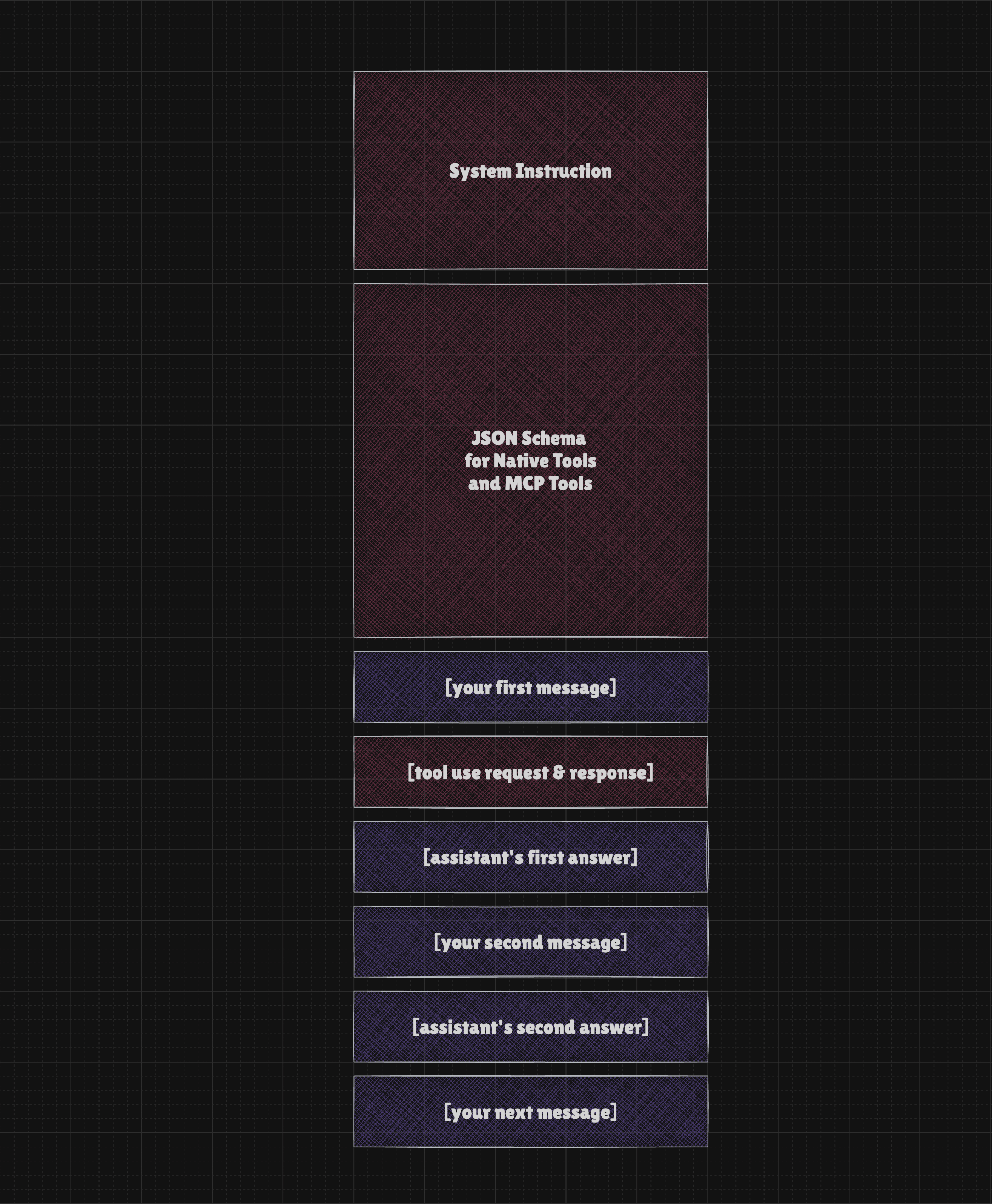
In other words, the LLM receives:
- a system instruction
- a JSON schema for the tools
- a chat history that includes user and assistant messages
- a record of the tools called thus far. It may include the entire content of each page you asked the AI to open.
Even if we have a 1–2 million token context window available, in practice, it quickly becomes filled when we use tools, and our request gets rejected. That's not all, because each time the LLM is called, we send the entire context again, which means we have to wait for those tokens to be processed and pay for them.
Clients like ChatGPT or Claude compress context behind the scenes, giving users the impression that there is no context limit and that the conversation can continue indefinitely. While this impression feels real, in reality, some information is lost along the way.
In practice, if you have a simple tool "load_website" and you ask the model to read a URL with an article that is really long, it can immediately throw you an error because the context window will be filled. But hey! We have models that support 1M context windows and more, right?
Context Understanding and Instruction Following
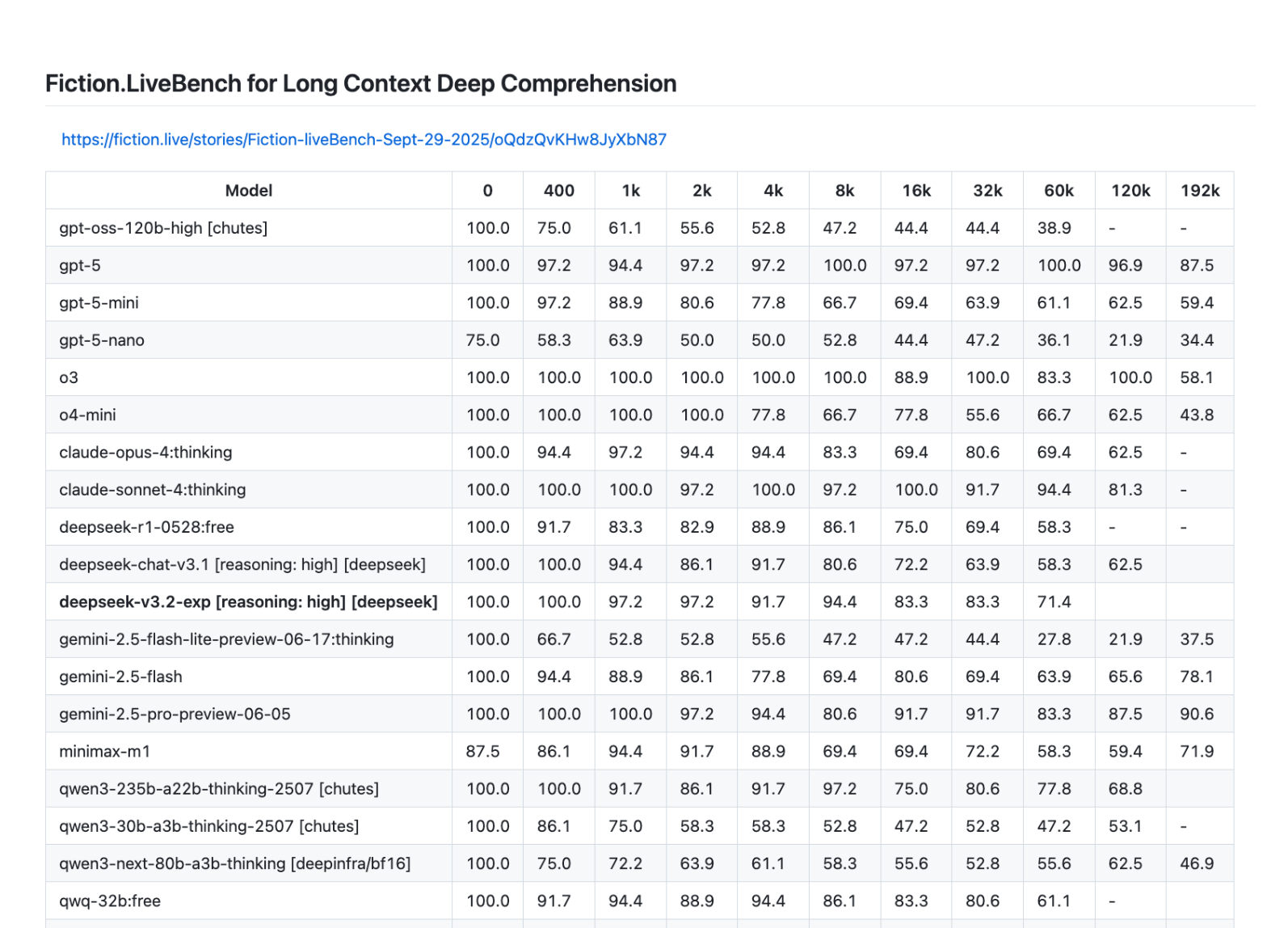
The fact that you can send a few dozen pages of text to a language model does not mean it can handle them well. Fiction.LiveBench for Long Context Deep Comprehension clearly shows how long contexts cause the response quality of LLMs to decline.
The ability to understand long contexts isn't the same as the ability to follow instructions, which also degrades with context length and many other factors.
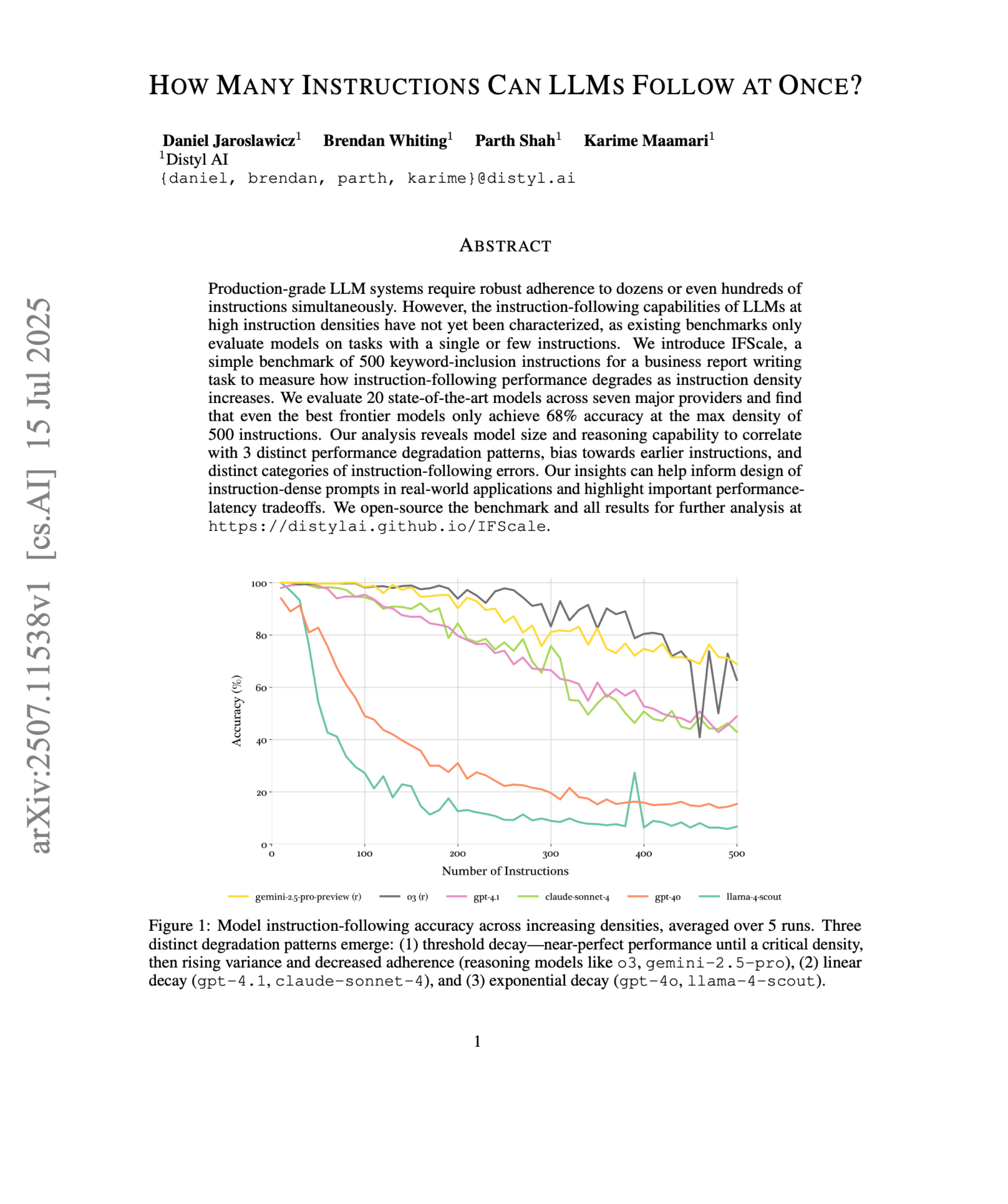
In practice, this means that the longer the conversation becomes, the lower the chance the model has of correctly using all the facts. The same applies to following instructions, so it's quite easy to observe that the model forgets the original task or drifts toward something we didn't want in the first place.
When using MCP tools, even a single tool call can sometimes inject so many tokens into the conversation that it quickly confuses the model and ultimately leads to the failure of the entire task. To be fair, it's worth noting that the time horizon of tasks an LLM can perform with at least a 50% success rate continues to grow.
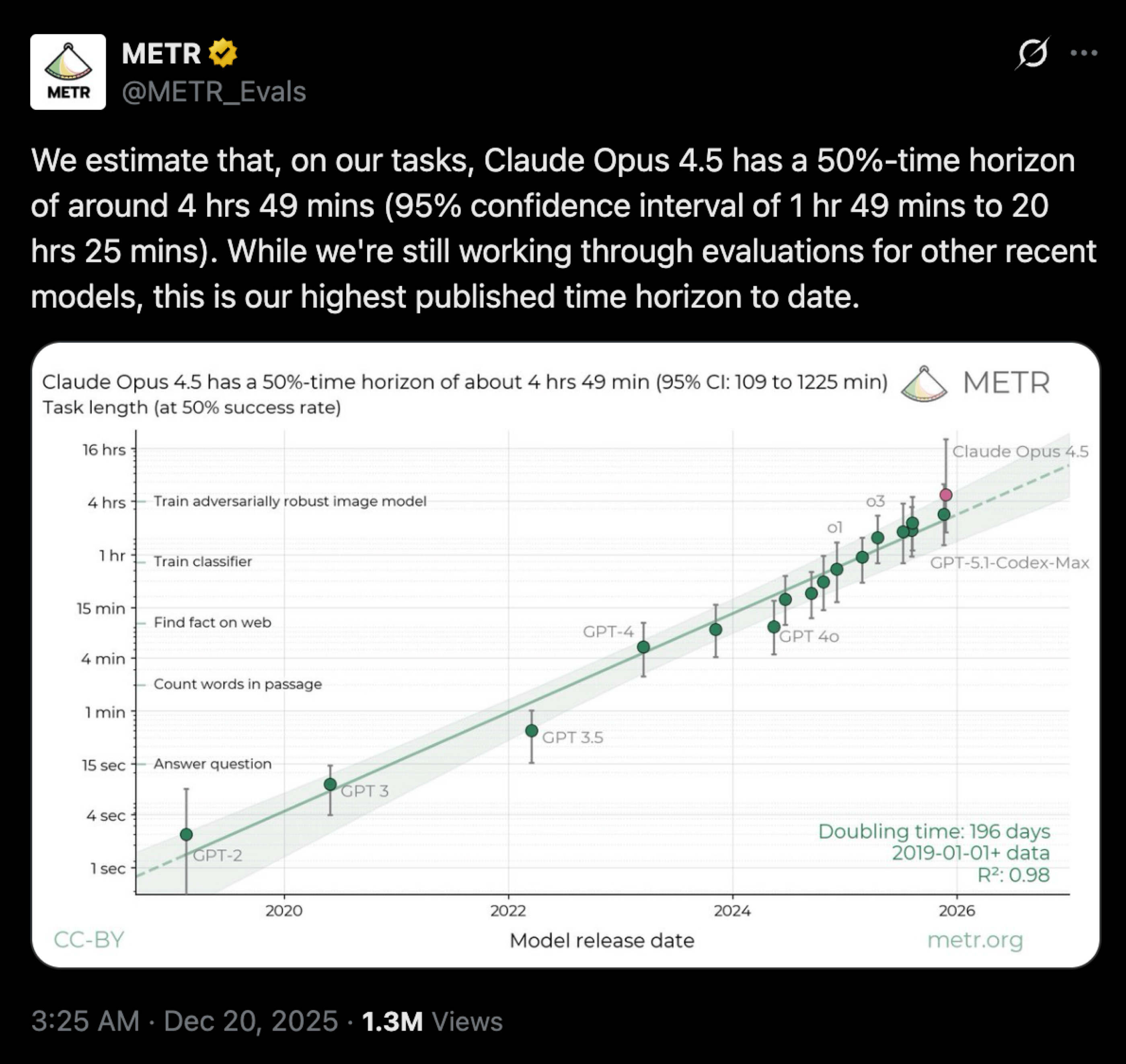
However, the benchmark below is quite controversial, and some people claim it does not reflect reality. I tend to agree with them, but at the same time, it's obvious to me that it shows a real trend. In any case, we're still far from achieving reliable, long-horizon, unsupervised operation of LLMs.
Knowledge cutoff and knowledge gap
The fact that LLMs are trained on a vast range of data from the Internet and many other sources does not mean they possess knowledge about everything or that their knowledge is up to date. Such limitations can cause them to fail at certain tasks, either because they lack sufficient information or because what they know isn't true anymore.
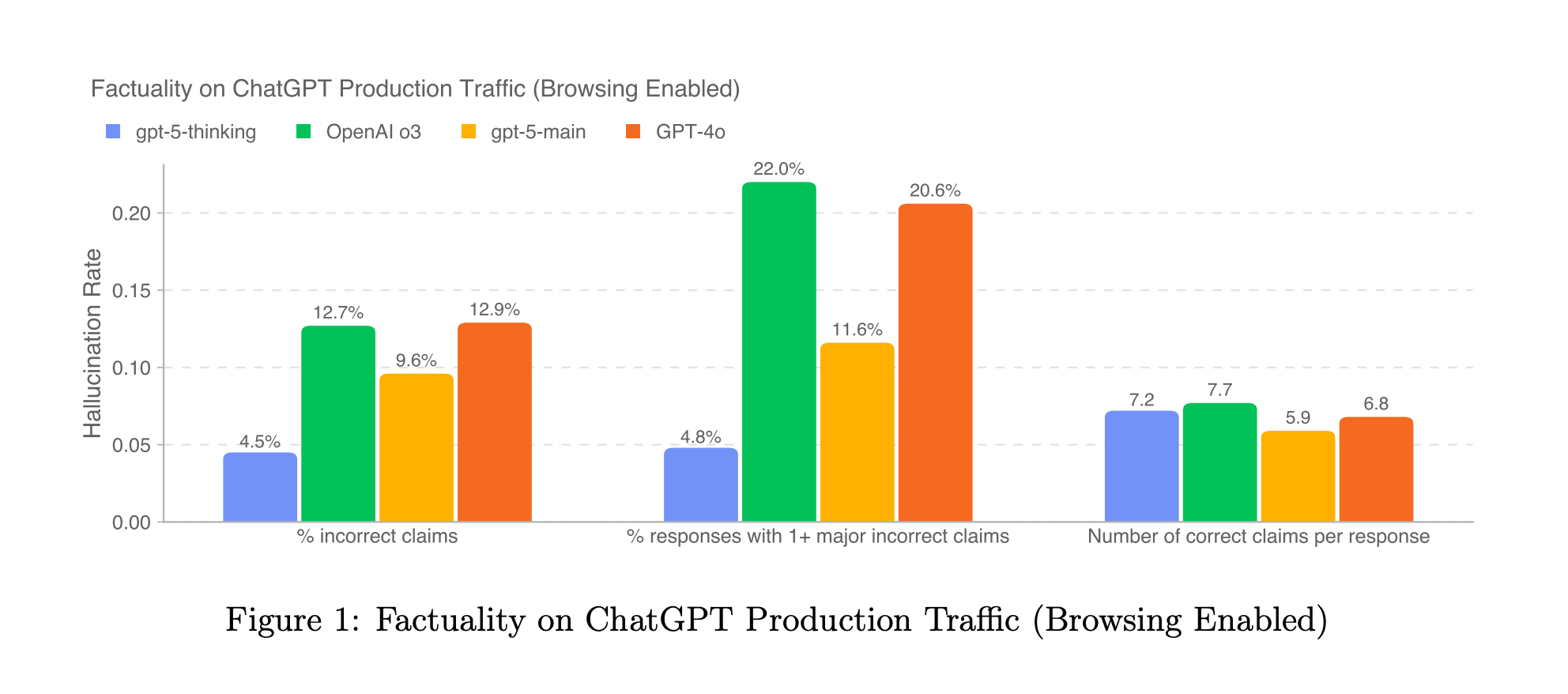
The good news is that the hallucination rate continues to decrease, and current models are now more likely to ask clarifying questions instead of jumping to incorrect conclusions. In practice, you can't expect that a system using an LLM will work with 100% predictability and consistency, regardless of its knowledge, although you may be interested in reading "Solving a Million-Step LLM Task with Zero Errors". But for most cases, certainty with LLMs isn't something that is currently within reach.
To some extent, we can address this issue by adding information to the context, such as web search results, which current LLMs handle quite well. Below is an example where web search was used to find the latest single of Nora En Pure (at the moment of writing this) and then play it on Spotify. It's title isn't available for this LLM by default, but we filled the gap.
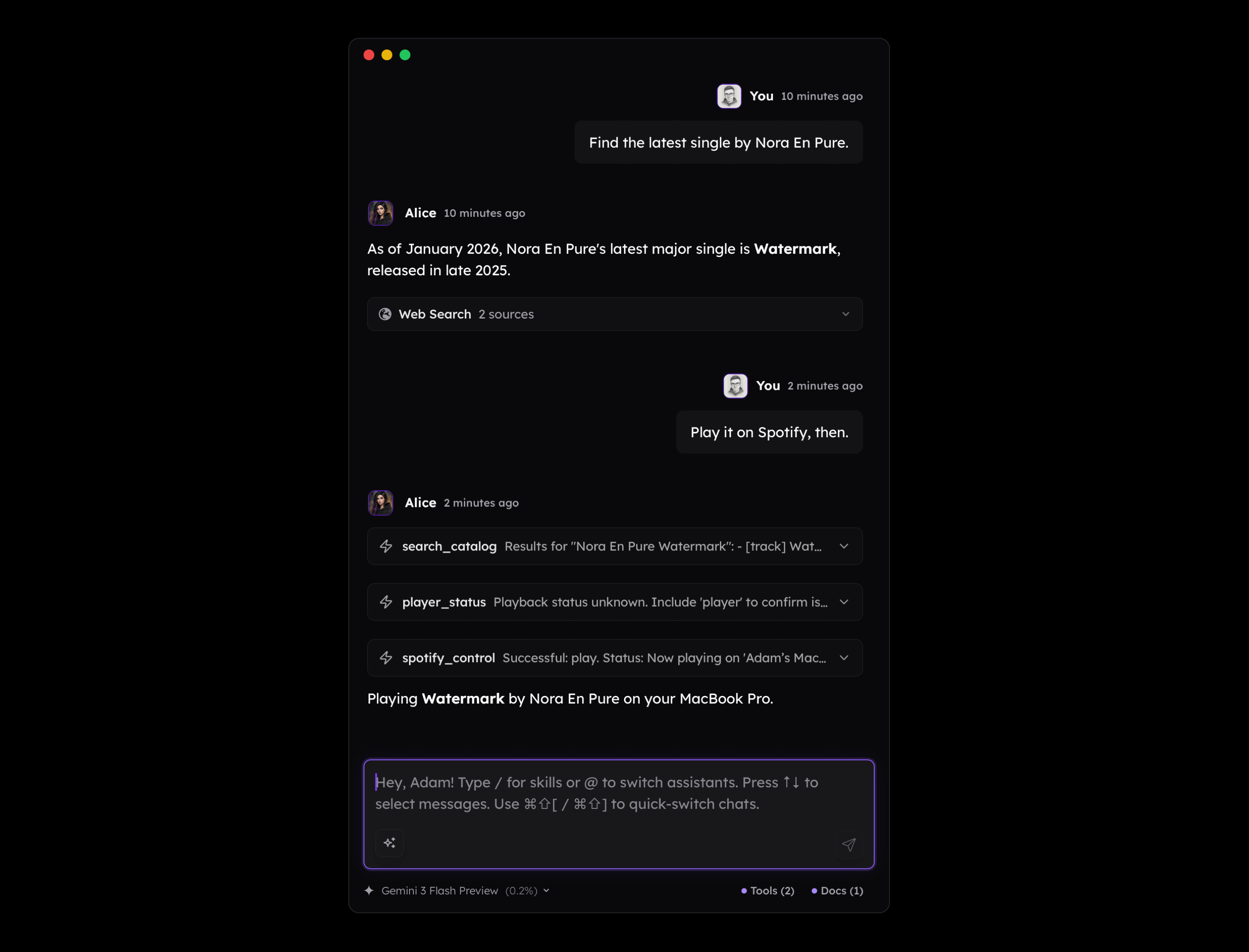
However, in practice, there are many scenarios where there is no simple way to connect the dots, or we cannot include all the data we have due to Context Window Limit.
For example, if I ask an LLM to assign a project to a given task, it may fail simply because it doesn't know that "Alice" in my context is the name of an app I'm developing. While providing a note about what I do is quite straightforward, when such a situation happens during a complex task involving multiple tools, the issue becomes real and hard to solve. This is the reason why Context Engineering has become so significant, but it is often perceived only through the lens of using LLMs to generate code. Here, however, we speak about automated context building within agentic logic.
The base knowledge of LLMs is also outdated in many cases, which you probably observe when an LLM writes code using outdated libraries or APIs.
Let's say you have an MCP Server for interacting with your app or service that isn't widely known, and there is no chance that the LLM has its documentation within its base knowledge. If your API is designed like this:
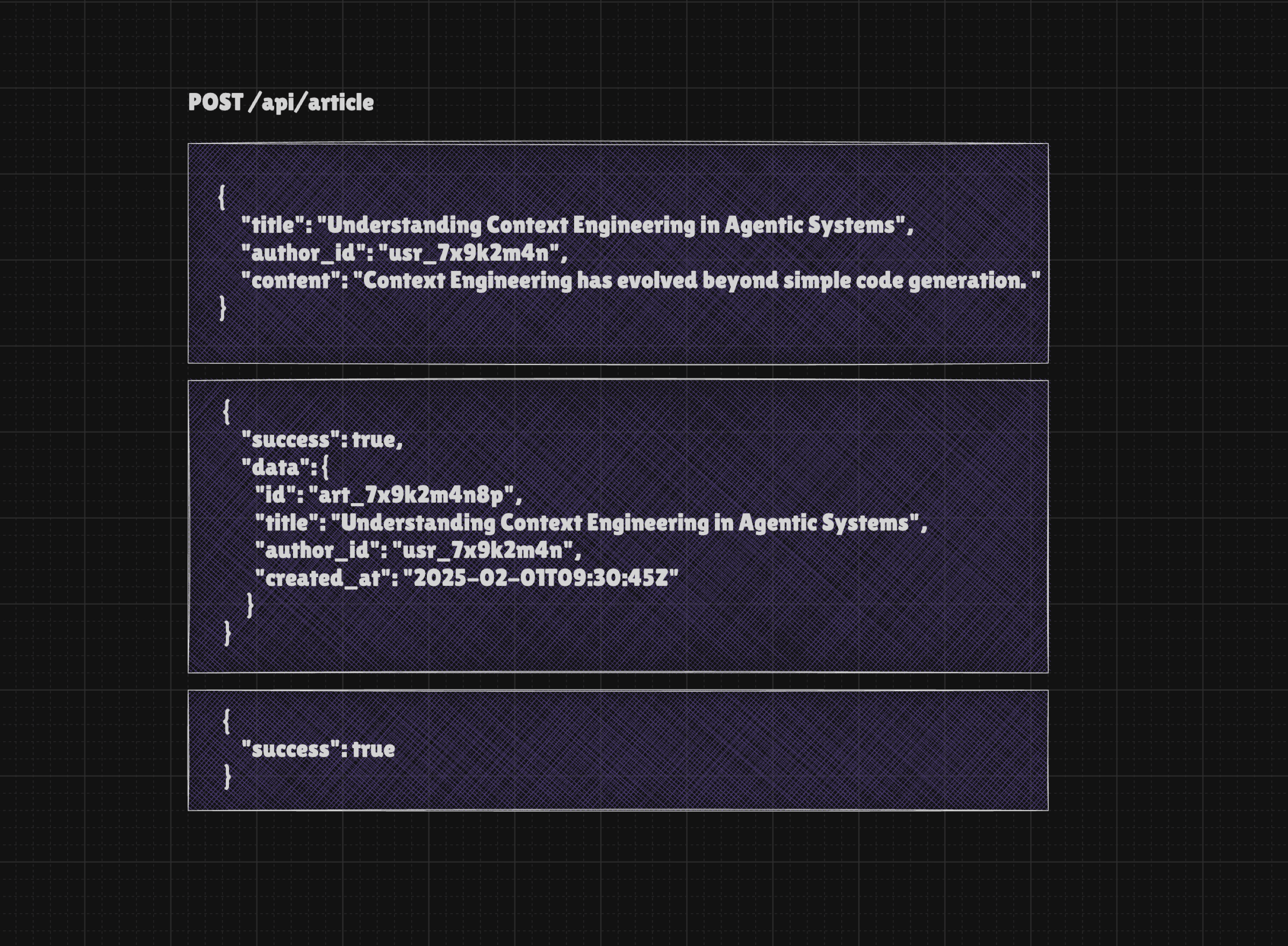
Do you see anything wrong with this simple example above? From programming perspective it's only quite limited but you may consider it valid as we pass the required information and receive a solid feedback. But for the AI Agent (or simply LLM) there are few unknowns:
- What is author_id and if it's just ID, how to know what's the name of the author? If the user says "publish article on my behalf" how to find their ID?
- Regarding the response: again, we don't know who the author is. We also don't know the URL of the newly created article, so the agent can't do anything with it. You may say that we could expose another tool such as
get_article, but it would require the model to take another step, which increases the risk of making a mistake and wastes tokens.
It is worth mentioning that we have API success responses similar to the example below, such as a simple "success": true. While this is acceptable from a code perspective, it is largely useless for an LLM. The problem is that many developers who work with Function Calling and MCP attempt to map their existing APIs 1:1. This logic is flawed because the original APIs were designed for programmers rather than LLMs. Although an LLM understands that a "success" value of true means the action succeeded, it is not enough to provide the user with valuable feedback, such as a link to a newly created entry.

For the end user, a knowledge cutoff, missing context, or the fact that an LLM does not have all possible knowledge is not always obvious. Any mistake resulting from these limitations will be considered either an MCP flaw or a bug in your app. Either way, this suggests that the tools must be augmented with additional context to help the model better perform the tasks the system is designed for.
Inference speed and token cost
Most LLMs we have today are quite slow, or very slow. While receiving an answer in a single call is relatively quick, relying on multiple tools can easily lead to several minutes of waiting. This delay would be perfectly acceptable if the user could be confident that the task would be completed successfully. Unfortunately, they cannot be.
According to Data Studios from which chart below comes from, typical inference speed is roughly at 32-55 tokens per second. This is quite slow, especially considering the fact that today we almost always work with LRMs (Large Reasoning Models) that "think" before answering.
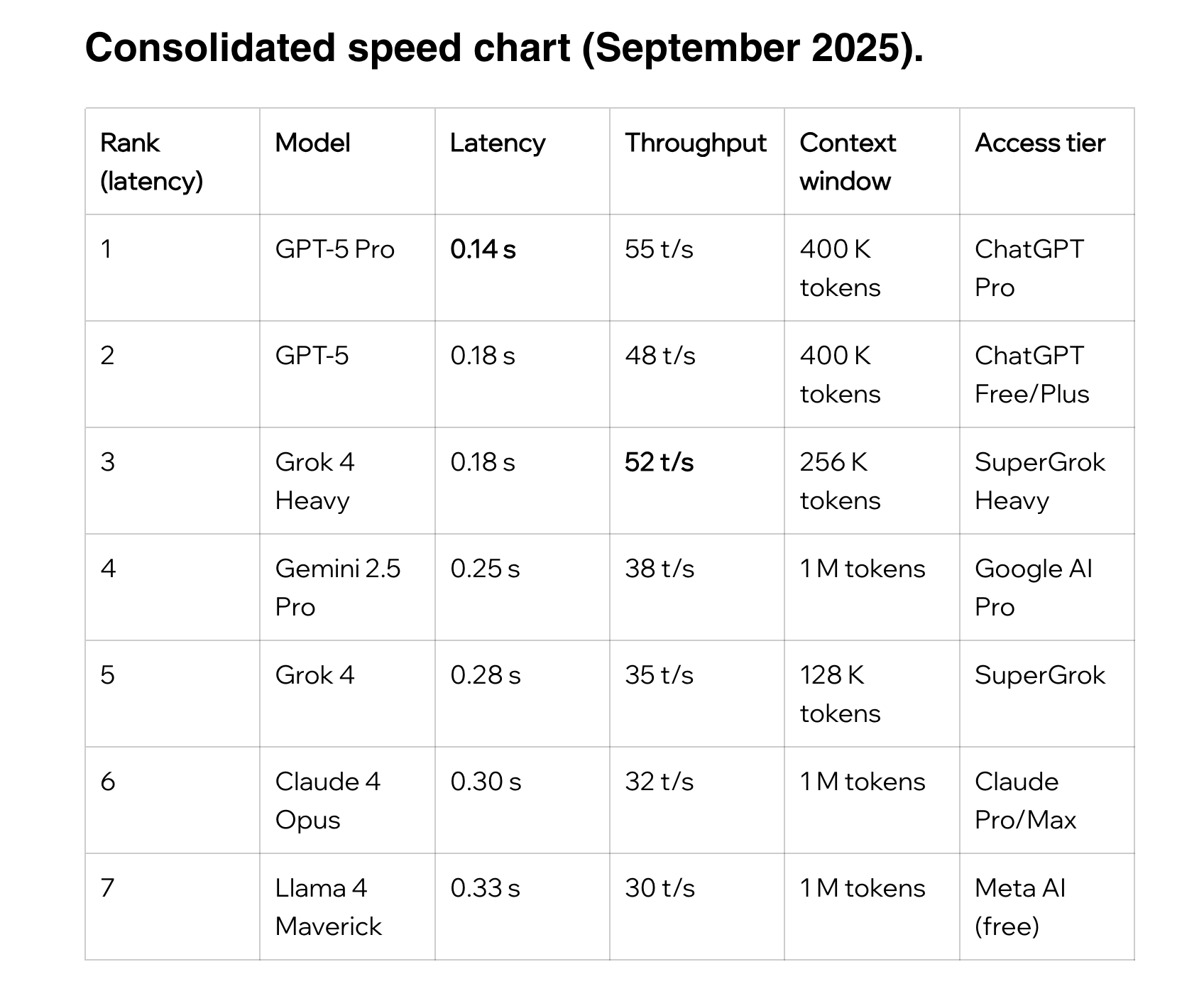 Source:
 The reality is more complex than this. Nowadays, we interact with agents far more often than with simple chatbots. This means that a single message can trigger dozens or even hundreds of queries under the hood, as seen in the screenshot below from the Langfuse platform.
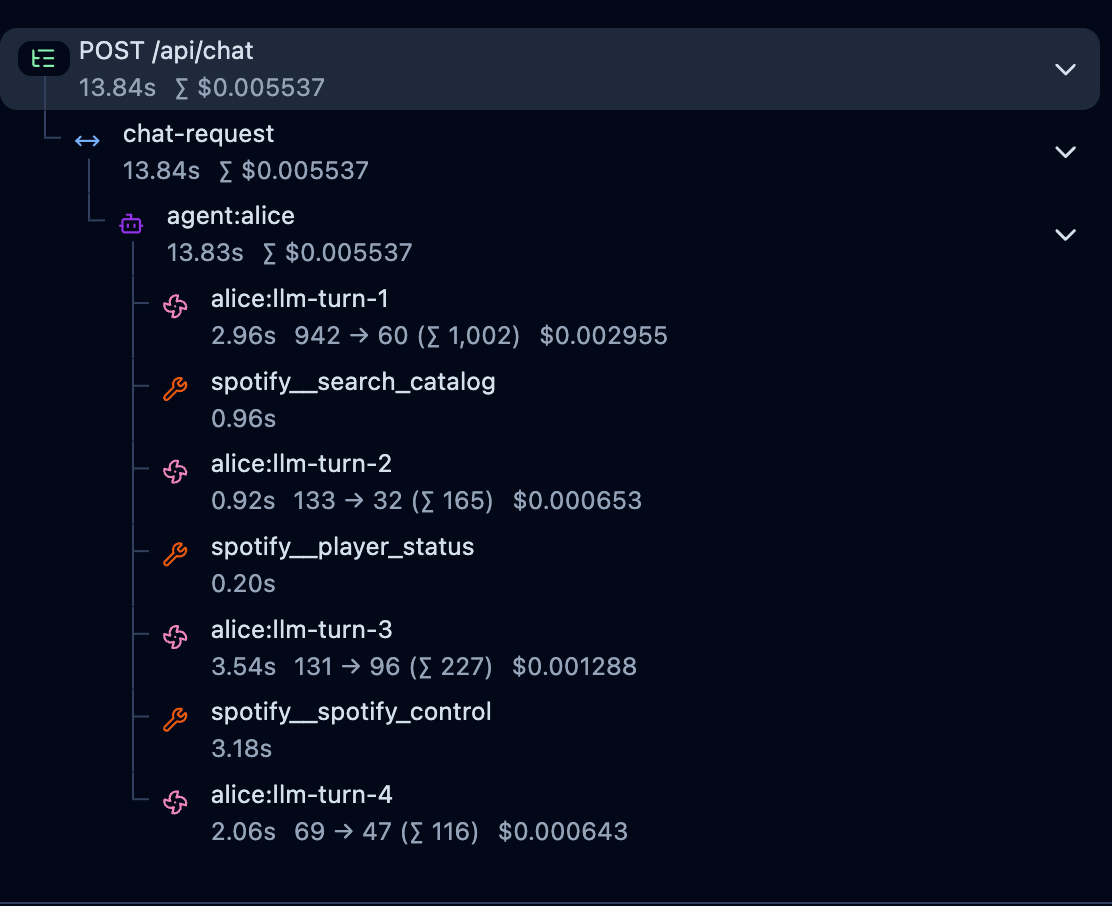
The logic of AI Agents often involves a loop that makes multiple API calls to the LLM provider until the agent finishes the tasks, decides to contact the user for any reason, or simply returns the result of its work.
Since LLMs generate responses token by token based on preceding content, it means that calling an LLM within a loop requires us to submit the entire conversation and system instruction or at least the necessary context that will be enough for the model to decide on the next step.
In result, a scenario in which you ask a question that requires a single tool use requires two API calls, for which you need to wait for the model to process existing tokens and new ones, and you pay double for tokens.
- Your initial query that makes the assistant generate a JSON payload
- A second query that makes the assistant generate an answer based on the tool's response
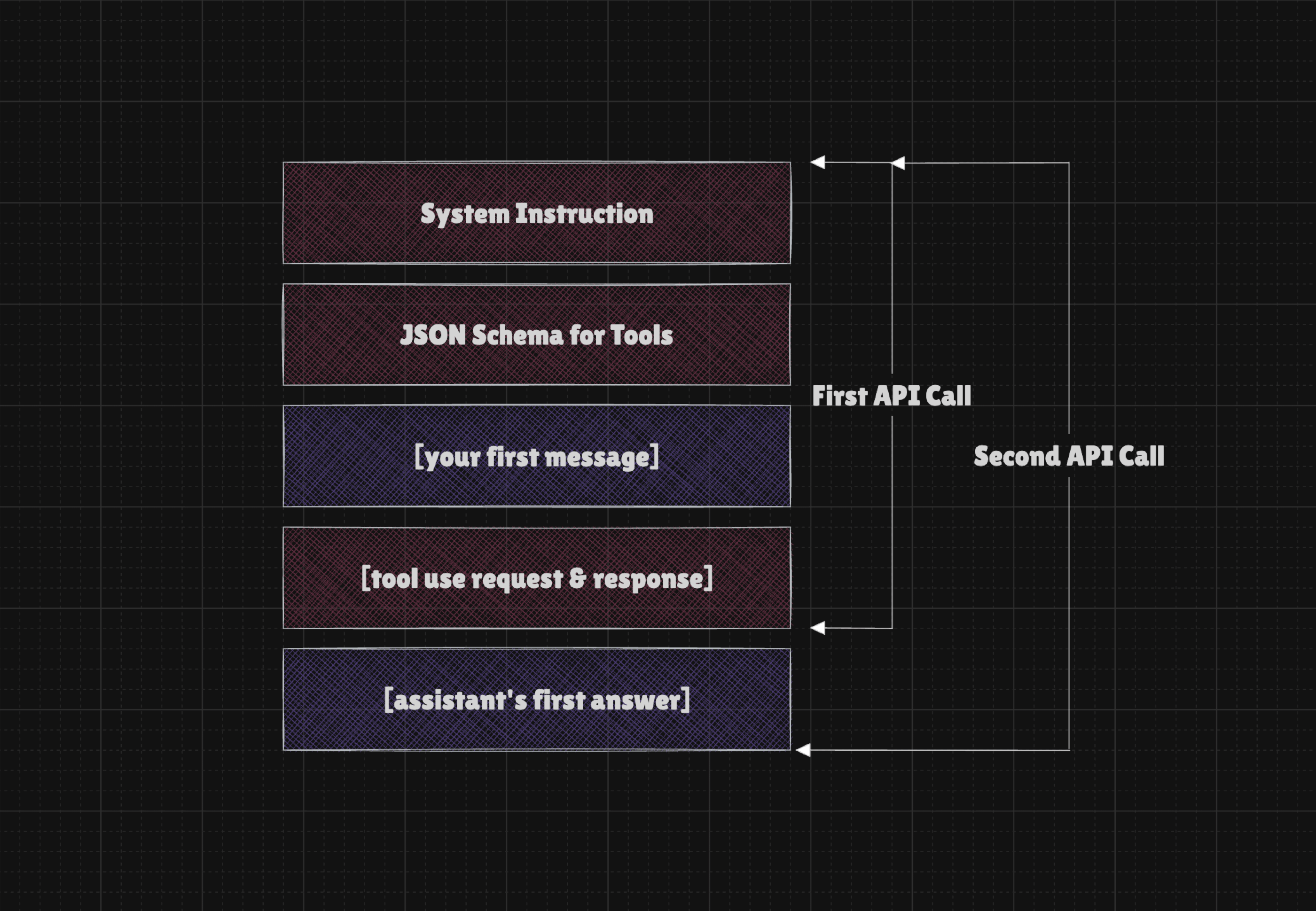
The fact that the tool definitions for Function Calling are part of the System Prompt in this case means the more tools you have, the more tokens are needed to calculate a response. This affects time to first token unless the system is designed in a way that utilizes Prompt Cache. Prompt Cache is often implicit and kicks in when the prompt (which is system instruction + schemas + ongoing conversation) does not change between turns.
Nonetheless, not every client developer knows how to properly use Prompt Cache, and sometimes it is quite tricky to manage it the right way. Even if you do it right, the first query will be calculated from scratch, and if you have a couple dozen tokens in the tool definition, then the time to first token will be much higher and you will pay more for the interaction.
Model Context Protocol from three perspectives
Model Context Protocol may be perceived in three lenses:
- MCP Client Developer (or rather Host Developers)
- MCP Server Developer
- MCP End User
MCP Client Developers (which are Hosts in fact) are often connected with creators of Claude, Claude Code, Cursor, Zed, ChatGPT or other Clients that offers integration with MCP. The fact is that if you create back-end app that uses LLMs and you want to give them tools, you can use MCP Servers to load them, so your back-end becomes a client (or a Host). BUT it is NOT required, as you can expose your tools simply as direct Function Calling JSON Schemas and have the entire logic in your codebase, and unless you need any particular feature of MCP, this isn't a bad option.
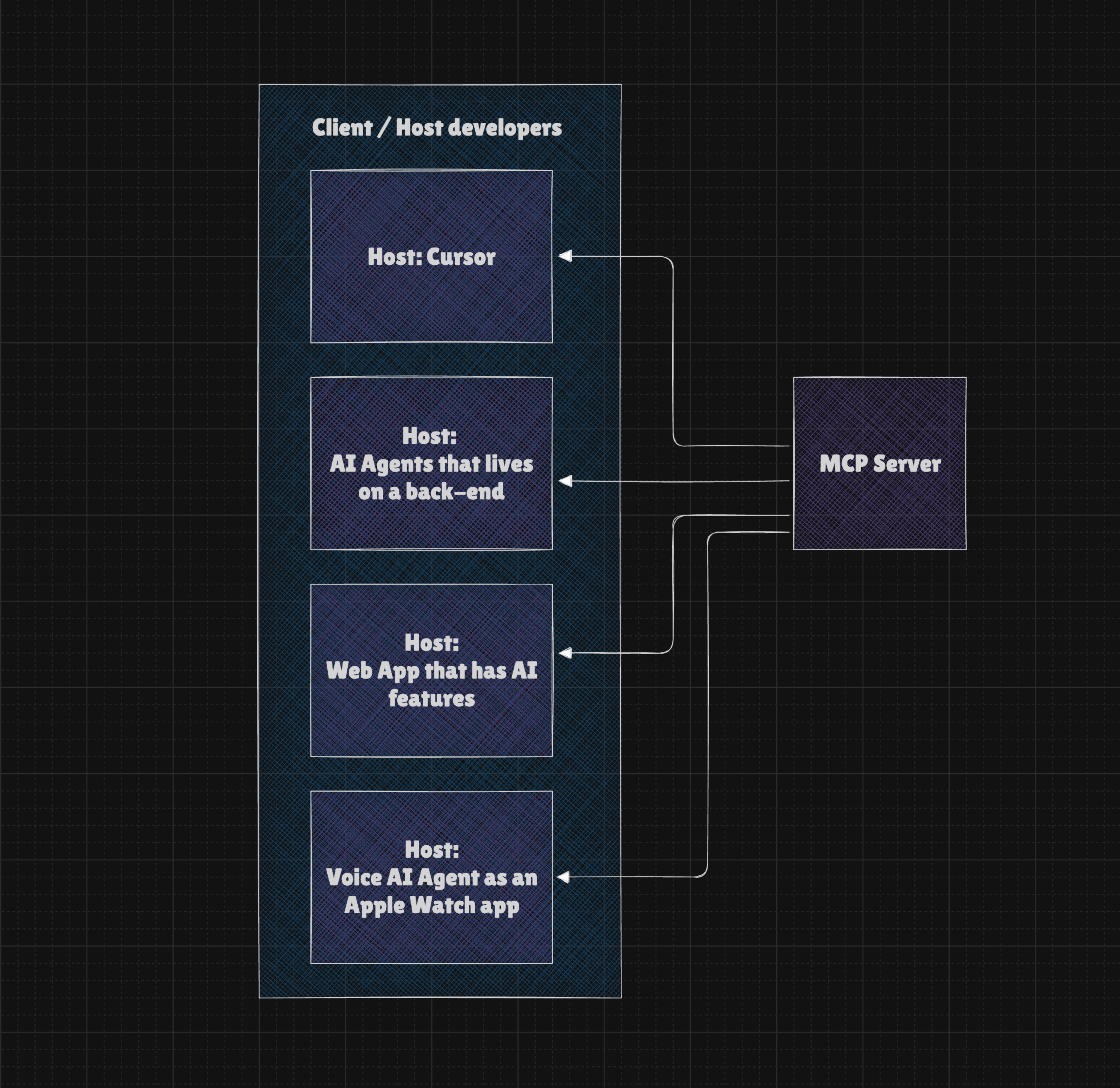
This is why I have Tesla MCP or Google Maps MCP. Both are useless in Claude Code or Cursor, but are crucial for my AI Agents that operate in the background and possess knowledge about my environment and can interact with it.
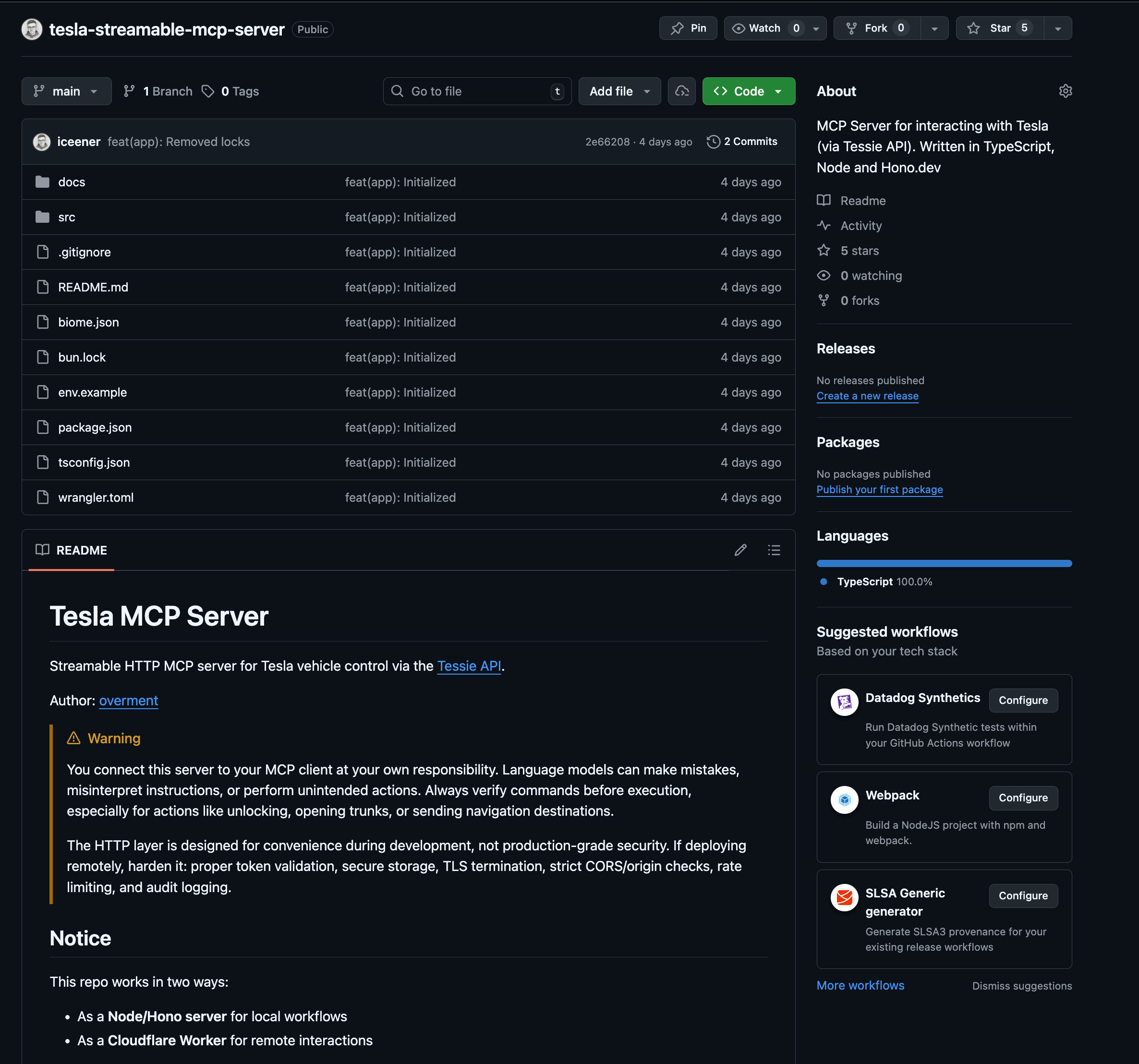
MCP Server developers are often programmers of apps and services who want to expose their products to end users in Claude or ChatGPT. However, you can create an MCP Server just for your own app and AI agents and never expose it directly to users. For example, I have an MCP Server that exposes common logic I use in three back-end apps, and two of them do not have an actual UI. In this case the MCP Server is for interacting with local FileSystem.
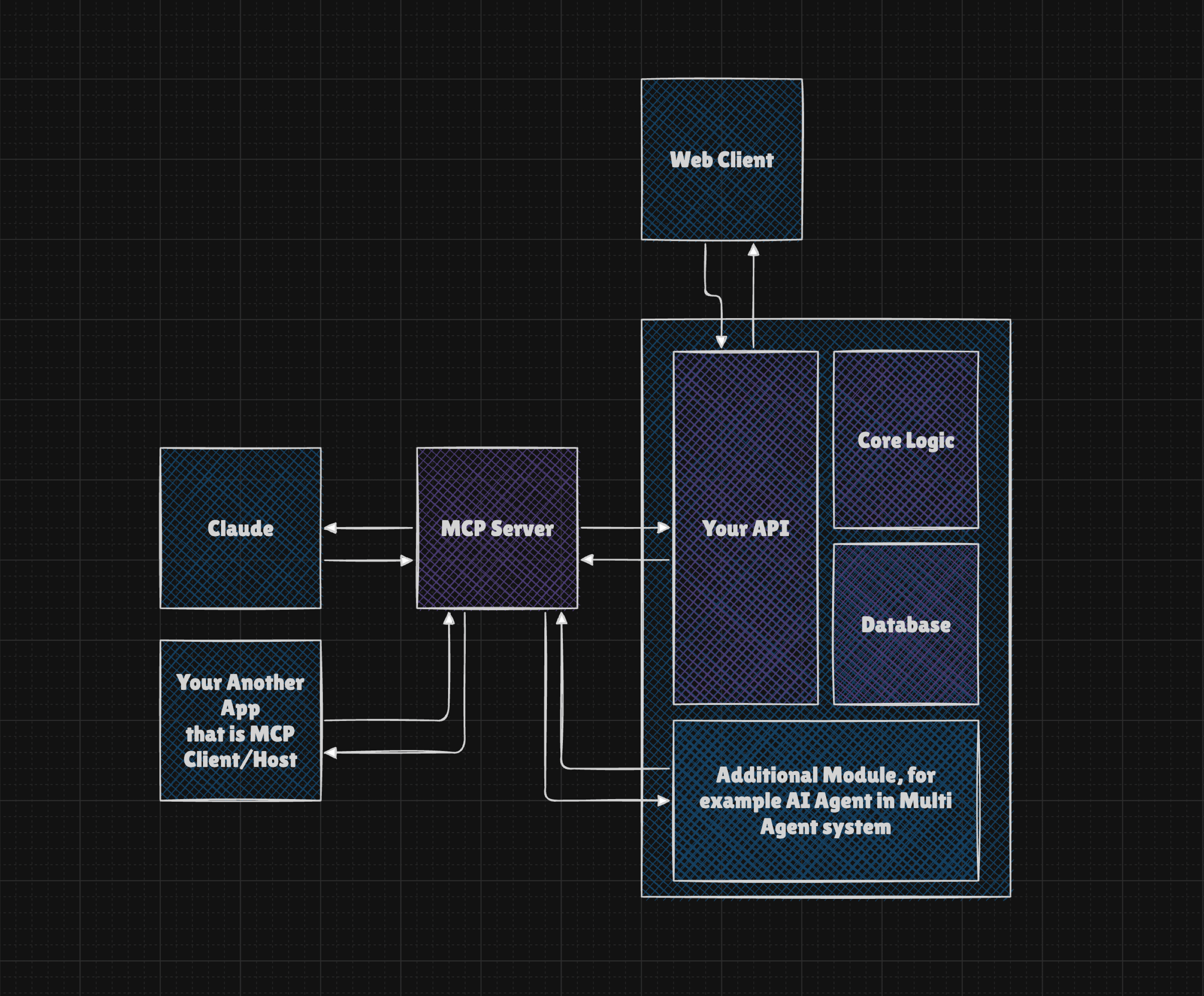
And lastly, we have MCP Users who are either users of MCP Clients such as the mentioned Claude or Cursor, but they may also be users of typical apps that have some AI features, so they use MCP without even knowing it. In any case, if the Claude user wants to integrate their assistant with Google Calendar, they may use MCP to simply log-in to their account and all available tools will be available to the model.
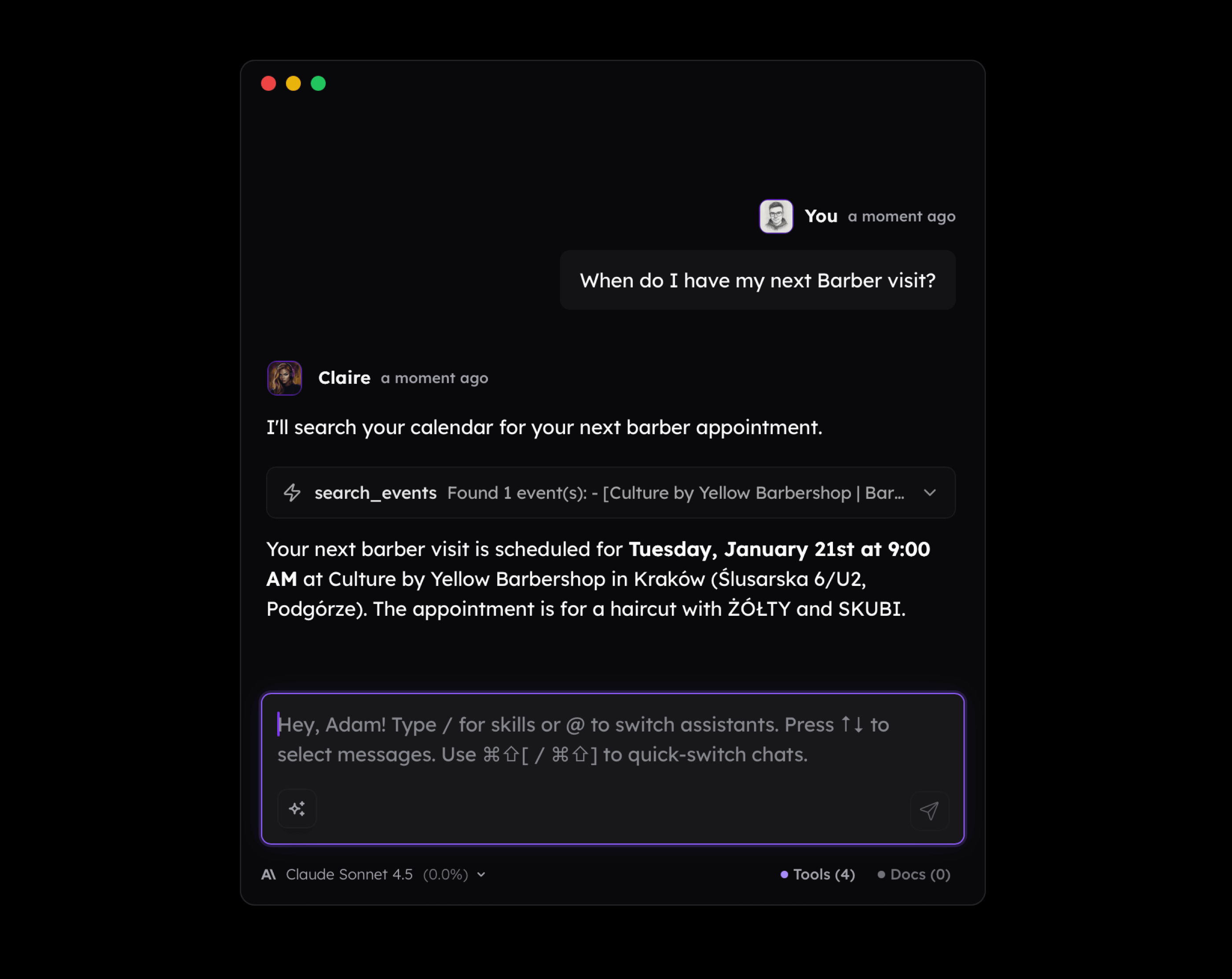
And this is why people say that "MCP is like a USB for AI." Unfortunately, it isn't always true, as connecting MCP is often a struggle because of complex authentication, account setup, custom URLs, or even a need for setting up a local environment. Even if this goes well, users are often confused about how to actually use the tools, what JSON format is, or why the agent does things they don't actually want. They also connect too many tools to a single agent, hitting the context limit or simply overloading the model with unnecessary information.
Model Context Protocol in Practice
Let's take a look at some use cases for MCP or, rather, function calling. I know that MCP offers more than exposing tools, but it is still its most common feature.
Controlling Spotify seems like a really silly idea for using AI. Because what is the reason behind using a Language Model to perform many steps that we can click through in a few seconds? There isn't any.
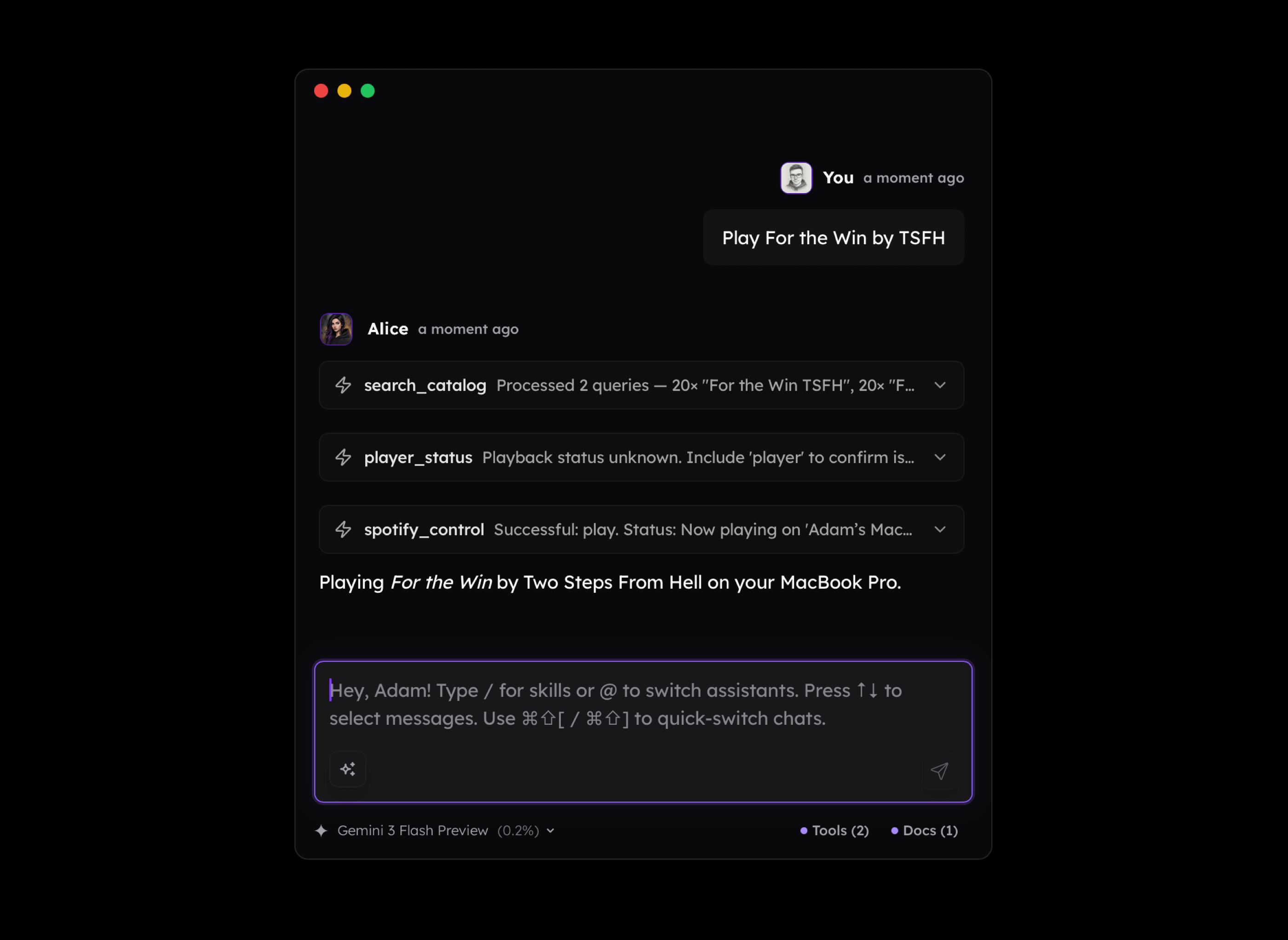
But if we shift our perspective a little bit and consider the fact that:
- Other tools may come into play
- Knowledge about us may be accessed by the LLM
- Environment information may be available
- The base knowledge of the model includes tons of useful information about the music industry and more
- The logic may be triggered in the background
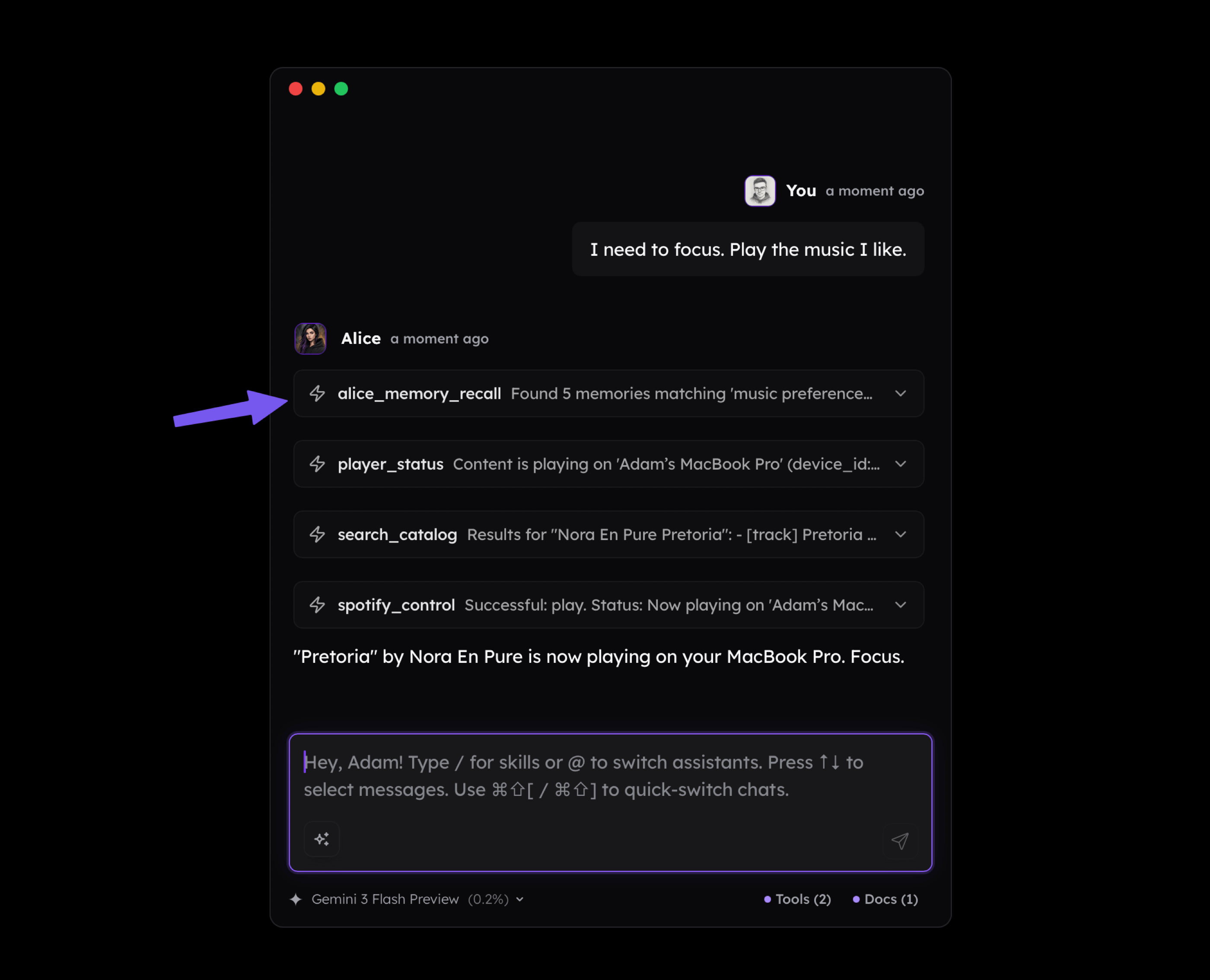
Suddenly, the model can do things such as connecting the dots between our activities, current environment, and external knowledge and be able to play music we mentioned before that helps us focus. As you see below, I didn't mention Nora En Pure in my message, but the long-term memory available to the assistant made it play it.
Another scenario is interacting with a calendar or to-do list. Why would I ever want to ask the LLM to list my issues in Linear when it is much simpler to just open it and see them directly?
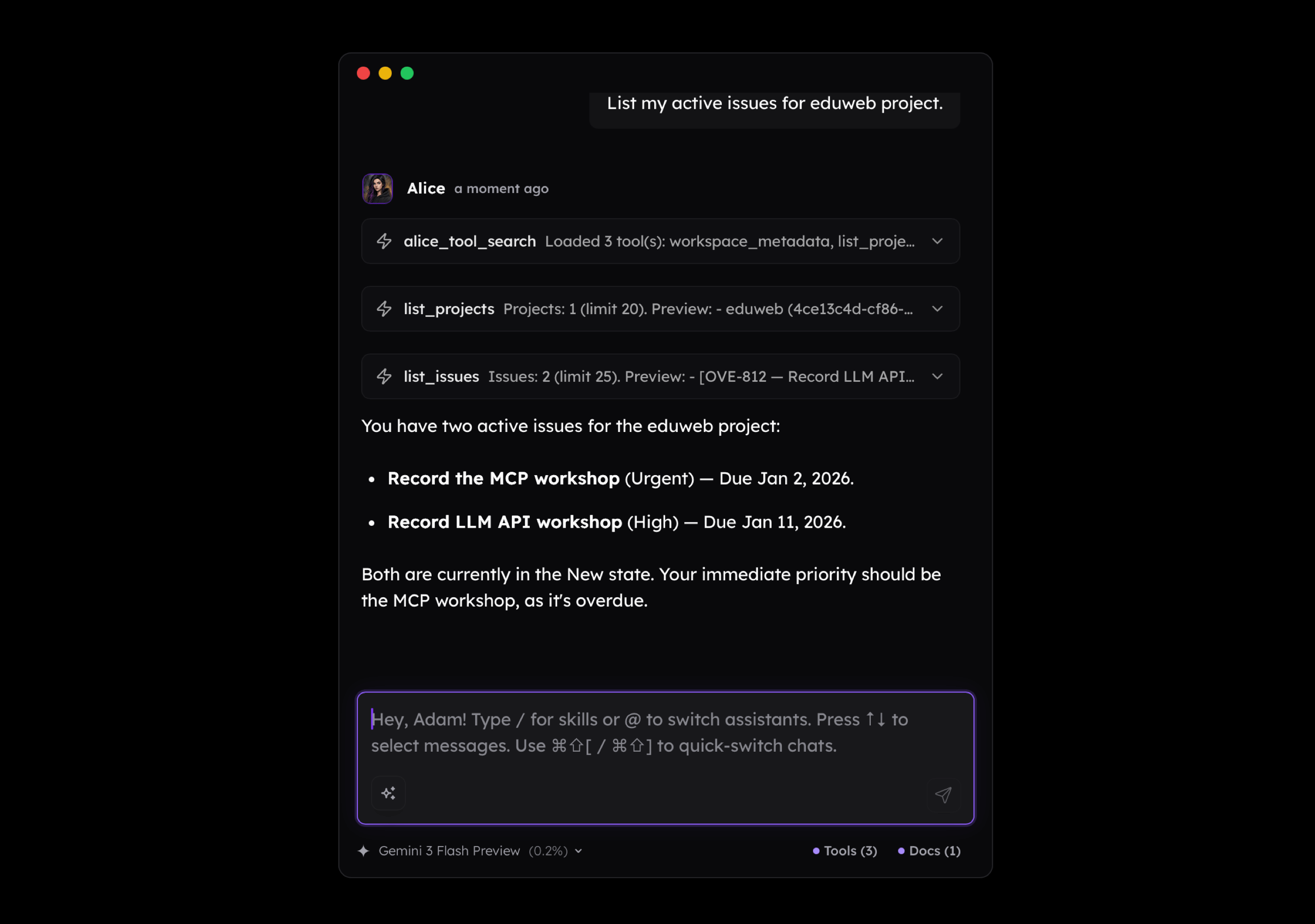
But it starts to make sense if you have notes that mention many tasks you need to put on your to-do list. Or if you recorded a voice memo on your smartphone or smartwatch and you ask your AI agent to convert it into a list of tasks. If there's more than one, the value you get from such workflow increases.

Similarly, the vibes shift when you start receiving personalized emails that collect the most important information from various profiles, both from your personal and professional life. The email you see below I receive daily, and its contents shift depending on what happens around me.

Personalized actions that adjust the way an AI agent or even a chatbot uses tools make work easier in various ways. For example, before LLMs, every time I had to generate a cover for my blog posts, newsletters, or live meetings, I had to open Figma, find a project, adjust the template, download it, and publish. Now, all I need to do is tell it what I want to see on a generated illustration (it uses the Nano Banana Pro model) and then tell it which version I want a banner for. The assistant knows upfront which template to use and how to put everything together.
What I'm trying to convey here is that the value of MCP (or Tools) increases significantly when they're enriched with personalized context (agent's memory) that can be loaded dynamically. And there's no need to make this complicated upfront, as even simple notes that the LLM can look up may do the job.
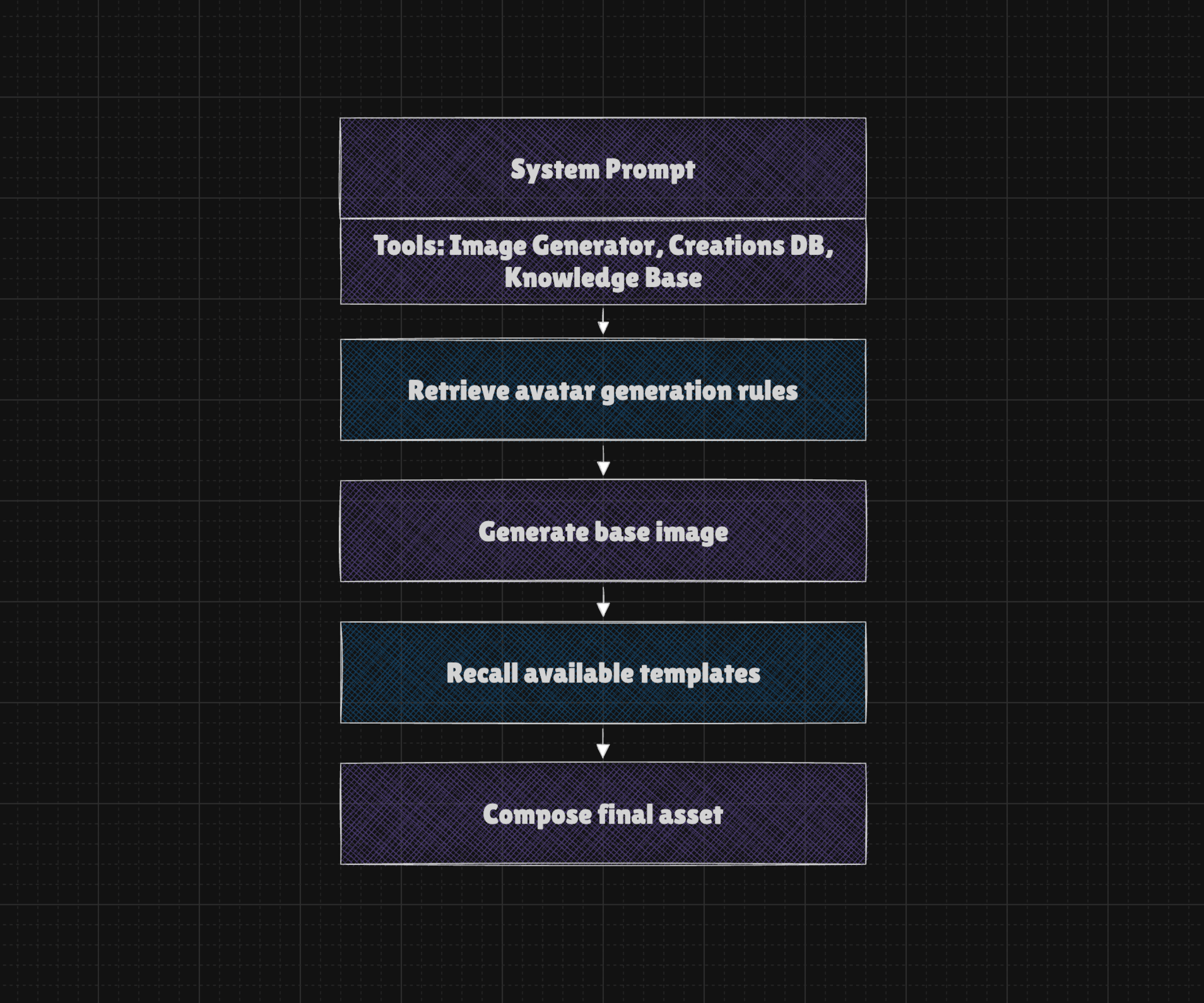
When looking at all this, there's one thing we may point out, and that is about using MCP in a way that makes it actually useful and designing the clients, servers, and the entire experience in a way that truly integrates with the user's environment and context.
But at this point the reality kicks in, making everything harder than it sounds. What I mean by this is:
- Official MCPs often maps API 1:1, so the tools are without a context and responses are full of irrelevant noise that makes LLM struggle with completing simple tasks
- MCP Clients may implement agentic logic in many ways, sometimes better, sometimes worse. Bug happens and sometimes their results aren't obvious as MCP simply fails but the user is unable to tell why.
- There's tons of limitations of the API that comes from either poor or incomplete design or a need to limit options due to spammers and various 'black-hat automations'.
- Platforms are surrounded with fences, making it impossible to let agents access or interact with the environment. For example when my Spotify is connected to Sonos speaker, API is unable to change the playback.
- Websites are either inaccessible to scrapers or actively block them, making even simple activities such as gathering news nearly impossible to automate.
- Customization does not work out of the box and require the user to gather context, make extensive setup and posses at least basic understanding of LLMs and their limitations
- The cost of creating complex agentic logic is often still too high considering the value it provides in daily life tasks. My personal bills usually exceed $3,000–$5,000 a month.
- Expectations are way too high as "LLMs can do more than we think and less than we can imagine".
- People have no idea how to work with MCP in a way that is actually useful, and even if Claude made it much easier to add connectors, there's still a need to rethink how to use AI that can actually interact with the environment.
- The provider's API is unstable and full of bugs. Timeouts, rate limits, empty responses, and performance issues are very common, resulting in a very poor user experience.
And I don't know if you noticed, but on this list, there is very little mention of Model Context Protocol, and it isn't a mistake because most of the issues arise outside of it.
From a technical point of view, the Model Context Protocol may have various flaws or issues related to security, reliability, authentication, setup, session management, and more. But even if it were flawless, it wouldn't solve the issues we face every day, because the problem is more complex than it looks at the surface.
Flaws that has nothing to do with Model Context Protocol
I think it is overall good to criticize and raise up any flaws related to the experience of Model Context Protocol. At the same time, I think that's a good idea to better understand what is going on under the hood, so we can raise the quality of discussion about possible solutions or make a decision that we're in a dead end.
-
Context Bloat: MCP is not responsible for context bloat. It is Function Calling that requires us to provide the list of tool definitions, including schemas, so the model can choose from them. You don't need to use MCP at all to have this issue.
-
Tool Responses: The structure and contents of the tool's responses aren't about MCP either, because MCP only exposes executor functions that are designed by MCP developers. You may not use MCP at all to have this issue with function calling. The function calling concept does not cover the way we store or process context from the tool calls, and it is often suggested to include the entire result within the main conversation thread.
-
Long Contents: If we ask the model to gather data using one tool and send it as an email using a second tool, it has to rewrite the entire contents between the tools. This is a fundamental trait of how LLMs work, and without certain logic and tools (such as a filesystem), there is really no way to avoid this. It drastically increases the costs and speed and increases the risk of mistakes.
-
Increased Costs: If you combine a need for including tool schemas and tool results with the contents of the ongoing conversation, after a few turns, you may fill the 200k context window. Again, you don't need MCP for having this issue.
-
Reduced Performance: Model performance drops obviously come from the fact that context is full of noise (aka Context Rot). But you also need to know that client developers are fighting to reduce costs. It means they use various techniques of compressing the contents of ongoing conversations, and it means some of the information may be lost along the way, making you see that responses are worse over time. However, it's because the model doesn't receive information you think it has.
-
Mistakes: Hallucination may happen without a clear reason. But the risk increases when the model receives similar tools such as add_task and add_issue. It may also happen when the user's messages are vague or incomplete. For example, the model may make assumptions to guess the email of the participants when adding Calendar Events. It may also be misled through the contents of the loaded website or email message! And this also has nothing to do with Model Context Protocol.
-
Prompt Injection: Prompt injection happens when system instructions are overridden by the context of an ongoing conversation, changing the model's intended behavior. It is an open problem, meaning it has no reliable solutions, and while we can decrease the risk of it, there is no way to fully prevent it. In any case, the risk of extracting information through misleading the agent about how it should use the tools is real, and it is a fundamental flaw of both the models themselves.
The issues listed above are strictly related to the models and concept of Function Calling. They are often mentioned as flaws of Model Context Protocol, but in fact, it has nothing (or very little) to do with them.
It doesn't mean that the Model Context Protocol is flawless and delivers on its promises or matches expectations, and despite the fact that it is widely adopted by almost all big labs and many clients, there are some issues with it. To be precise:
-
USB: Connecting MCP is complicated and while it is getting better, there's often a need to craft custom URLs, grab API keys or Secrets. For STDIO servers without MCPB it is also required a dance with environment configuration which is simply too much even for technical folks.
-
Deployment: Handling OAuth, Sessions, Permissions and other config is quite complicated from developer's perspective. While making it work as a demo, or just for yourself is easy, deploying server on production is difficult even for experienced developers.
-
Stability: Protocols evolve, and that's natural, but this quickly leads to compatibility issues that are tricky to solve due to often limited details from logs and differences in the way Clients and Servers are implemented. Also it quickly moved from STDIO through SSE to Streamable HTTP protocols which translates to lots of confusion and compability issues.
-
Implementation: There are issues related to protocol adoption. For example, if you develop a server that exposes Server Instruction (a message that describes the server in general), you cannot be sure that the client will even consider this. The same goes with other MCP features such as Resources, Prompts or Sampling. Also clients often lacks configuration options and easy way to decide which server should be active at a given moment.
-
Trust: MCPs hosted on external servers may change, which can affect your client or system and make detection difficult. Even if you implement checksum verification to detect changes, users may overlook it. The tools are not clearly described as potentially dangerous, so the client has very limited knowledge about managing their permissions.
As you can see, the Model Context Protocol itself has various flaws, but overall, it isn't that bad. In practice, it doesn't make too much of a difference, but it is worth noting where the issues come from.
Speak the solutions, not problems
Now, lets talk about what we can actually do about MCP or Function Calling in general to get the most value out of the agents connected with external world.
Context Management
You can use as many tools as you want. You just need to keep the initial context size as low as possible. So:
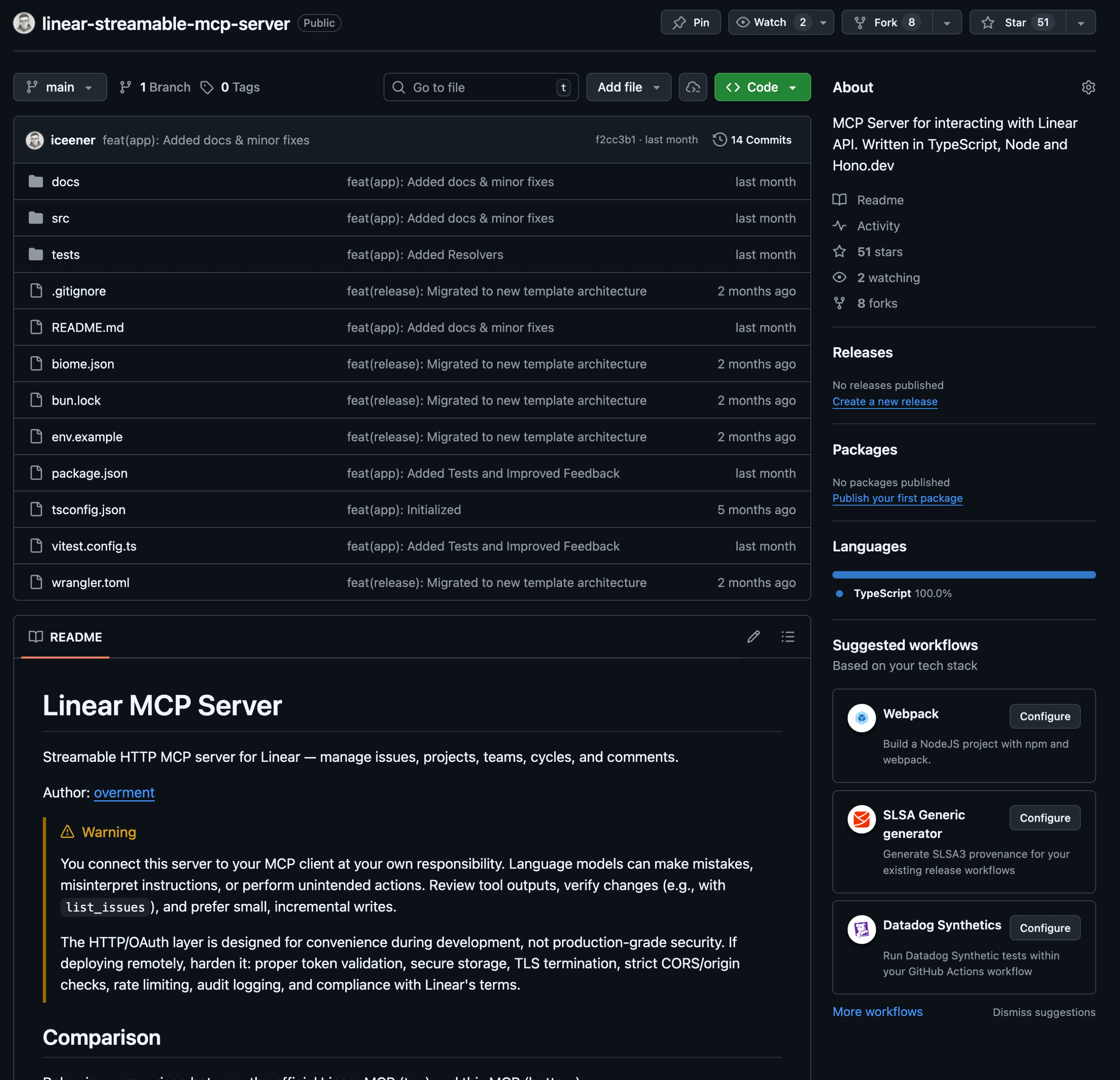
- Prefer MCP servers that are well-opinionated, not necessarily official ones or those you generate yourself. For example, I created a Linear MCP for myself because I wanted to optimize it in many ways compared to the official server from the Linear team itself. You can find the source code here: https://github.com/iceener/linear-streamable-mcp-server
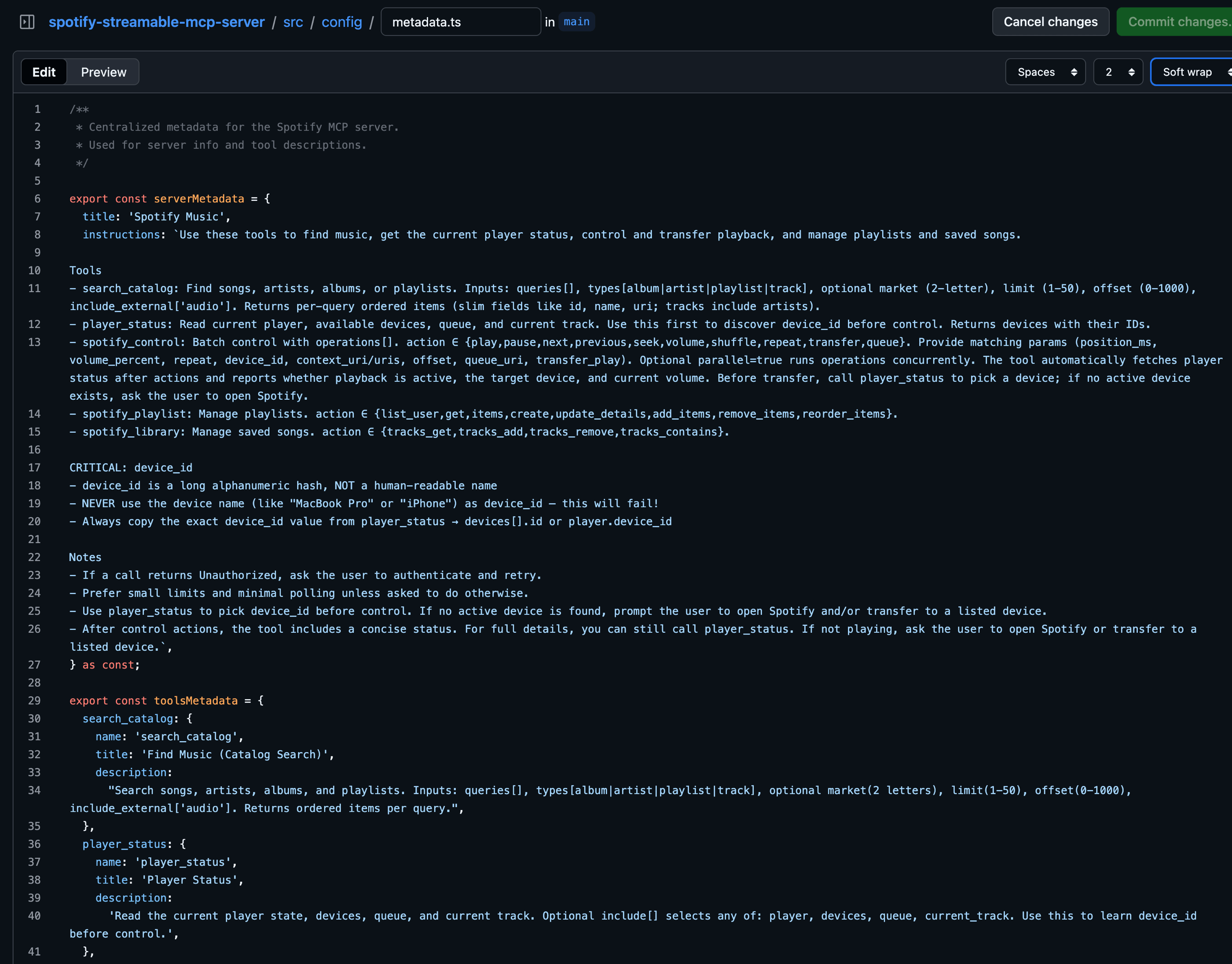
- Always maintain clear and concise names and descriptions for tools, resources, agents, and anything intended for LLM use. Whenever a schema is involved, ensure descriptions are written to be understood without consulting external documentation. Since a tool's entire schema may not be available upfront, pay special attention to the description to ensure clarity even without the complete input or output structures. The best way to design them is to iterate or, if possible, to evaluate them based on synthetic or production (anonymized) datasets.
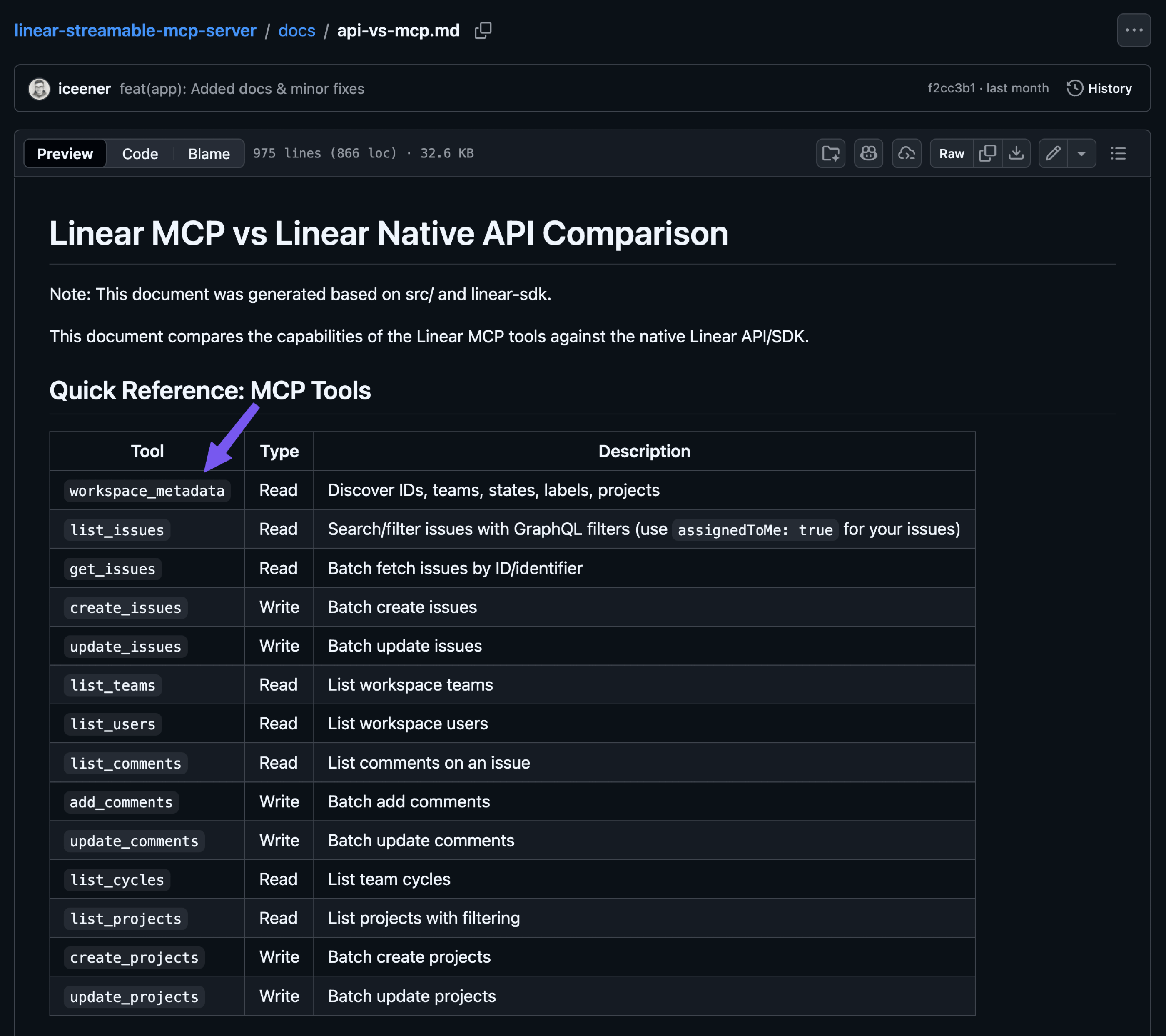
- When creating a tool, whether it is an MCP or a native one, avoid mapping the API one-to-one. Instead, find a way to reduce the number of tools without making them too complex. For example, the Linear API does not naturally expose anything like the
workspace_metadatashown below, so I created this tool to consolidate the identifiers for teams, states, labels, users, and projects into a single endpoint. This way, I reduced the context needed to expose all these tools and decreased the number of tokens returned because the LLM can decide which identifiers to fetch.
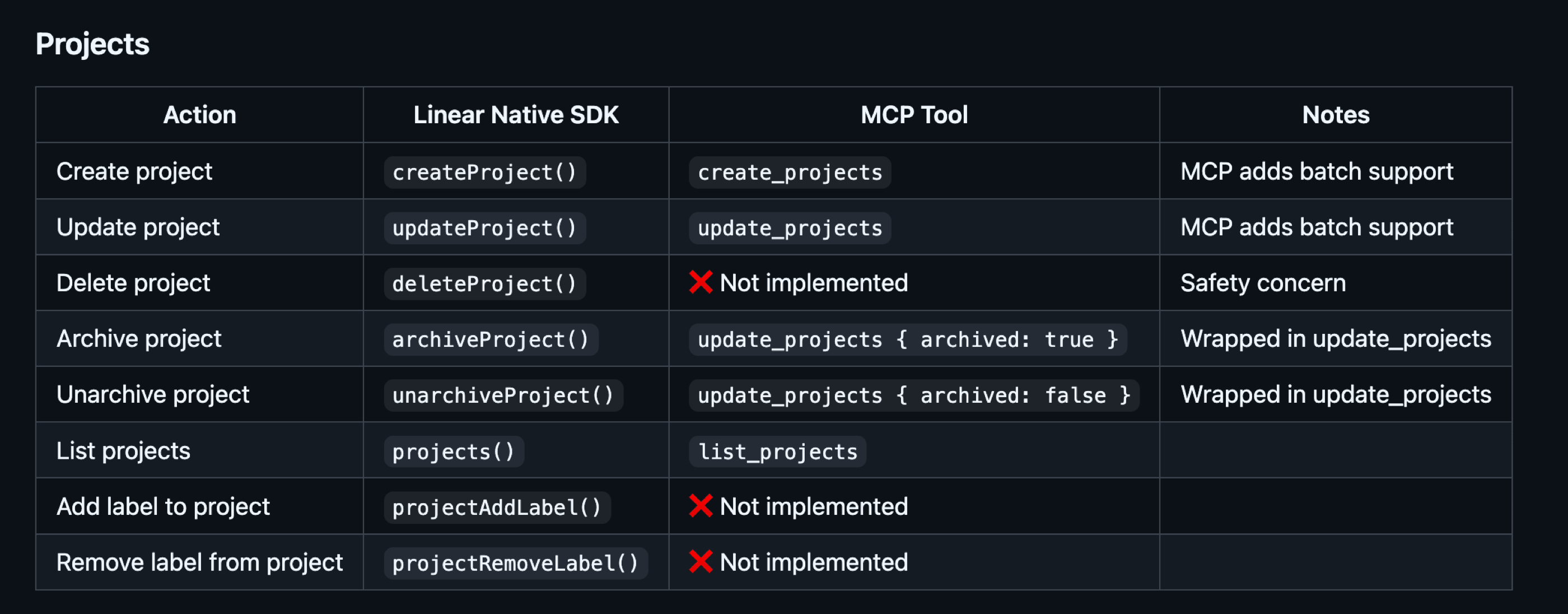
- Skip the endpoints that are rarely used or should not be available to the AI agent. For example, I do not want the agent to delete my projects in Linear, so I skip the related endpoints entirely. The same goes for actions such as adding a label, which happens so rarely in my case that I can easily do it myself. This also shows how the MCP can be customized to our needs. The fact that we can now generate entire MCP servers using LLMs makes even more sense, especially if we use them within our team.
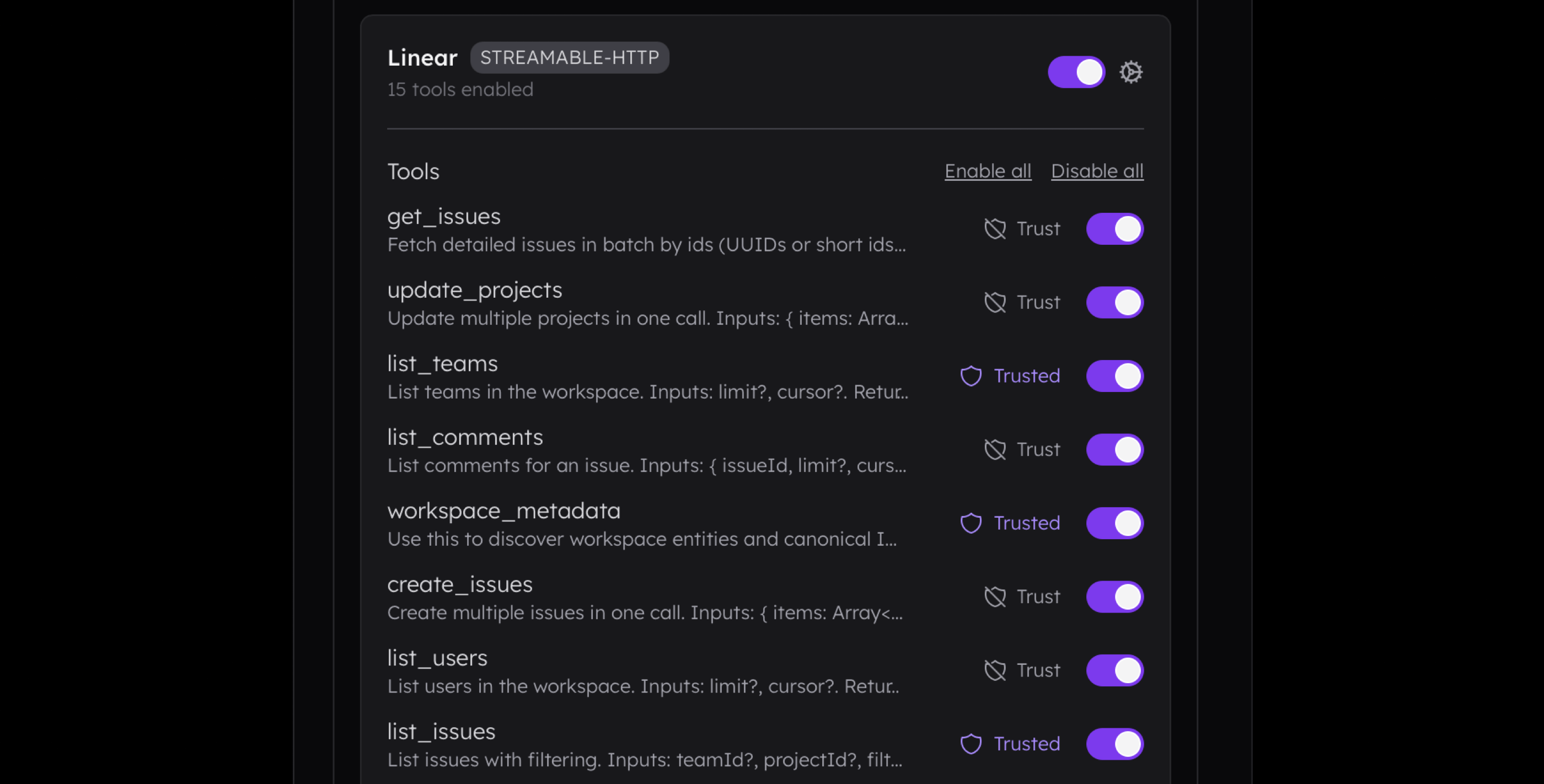
- Pick the client that offers control over active MCP servers, their tools, resources, prompts, and native built-in tools. Furthermore, if you design an MCP host, always prioritize these settings, including an option to mark a tool as trusted so it no longer requires confirmation.
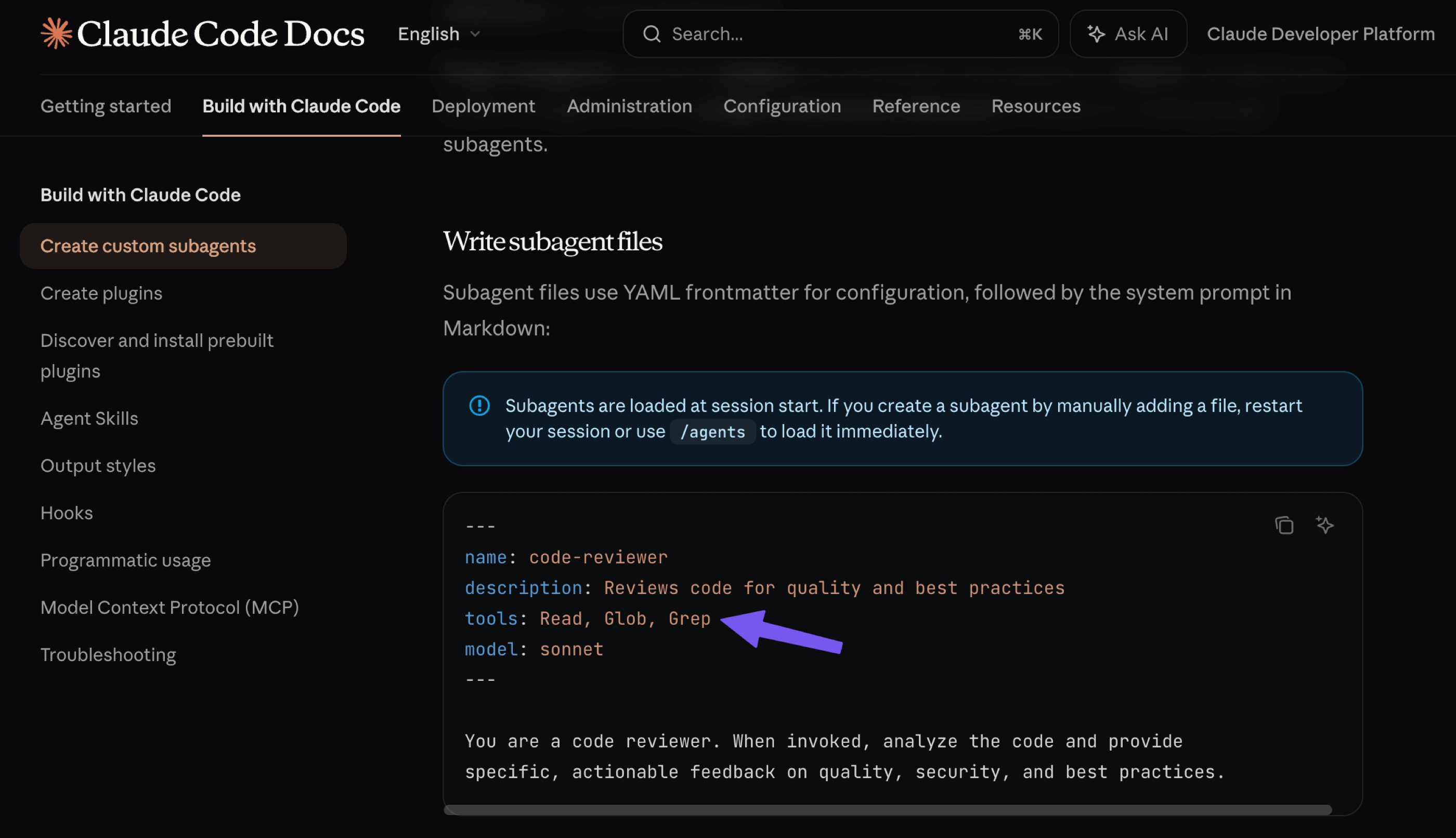
- Pick the clients that support multiple agent profiles and multi-agentic logic, which allows one agent to call others. For example, Claude Code offers an option to create a subagent that can be called by name or description. This subagent may have its own tools that are loaded into a separate context.
Below, we can see how the agent "Ellie" was assigned a task by another agent, "Alice," to check the current Bitcoin price. The tool associated with the crypto market was assigned to "Ellie" in this instance. Such an interaction provides much better control over the context because the main thread contains only the result returned by "Ellie," without her system prompt, tool definitions, or the full tool results.
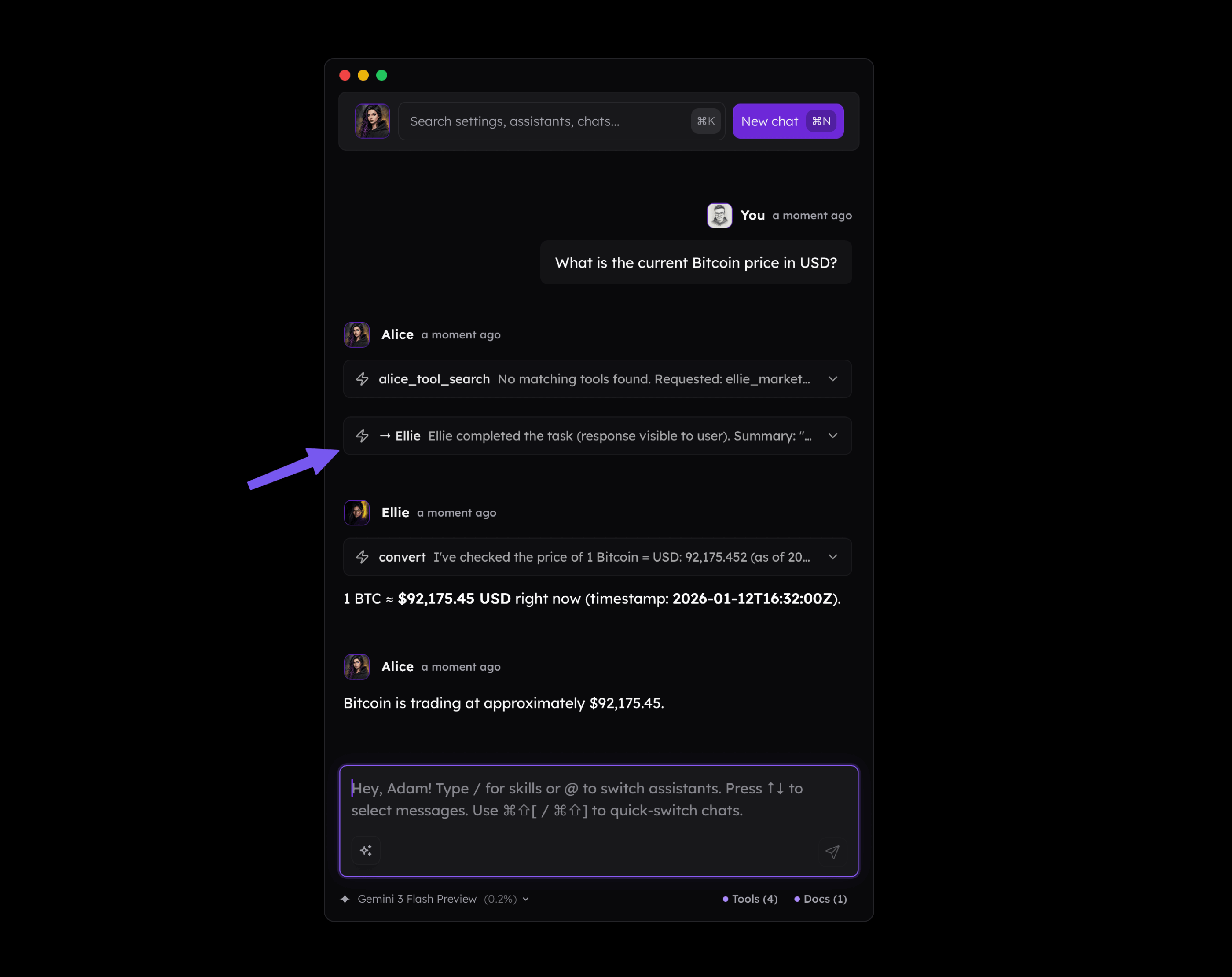
- If you look closely at the screenshot above, you will notice that
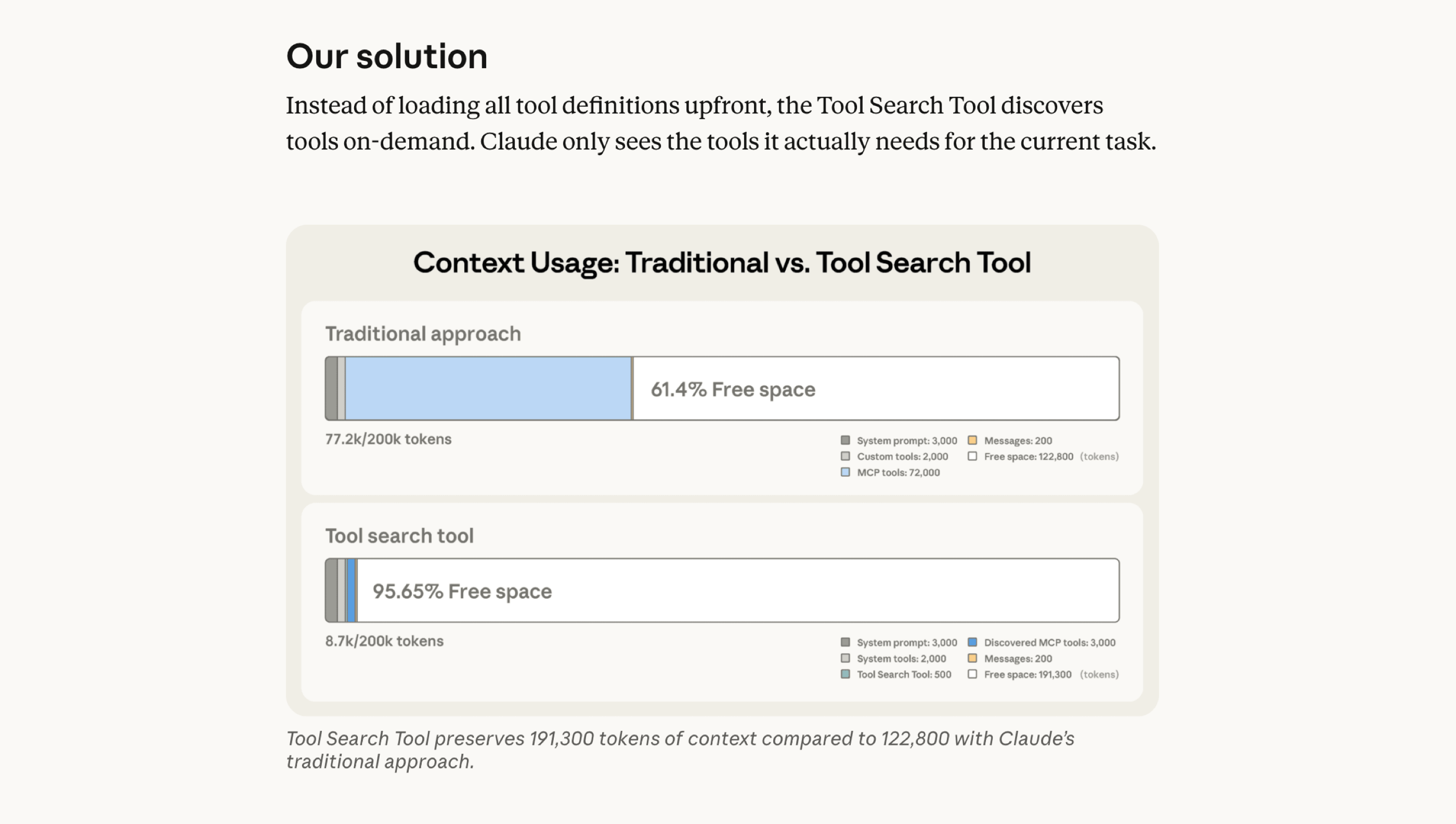
alice_tool_searchwas called to find the tools needed to fulfill the user's request. In such a case, we are talking about "progressive disclosure". This tool is extremely useful because, as I mentioned before, you would normally need to load all the tools assigned to a given agent. In my case, Alice has over 20 tools assigned; instead of loading their definitions into the context regardless of whether they are needed, the agent retrieves them only when it actually needs them. A concept of this tool comes from Anthropic and based on my own experience it works very well in practice.
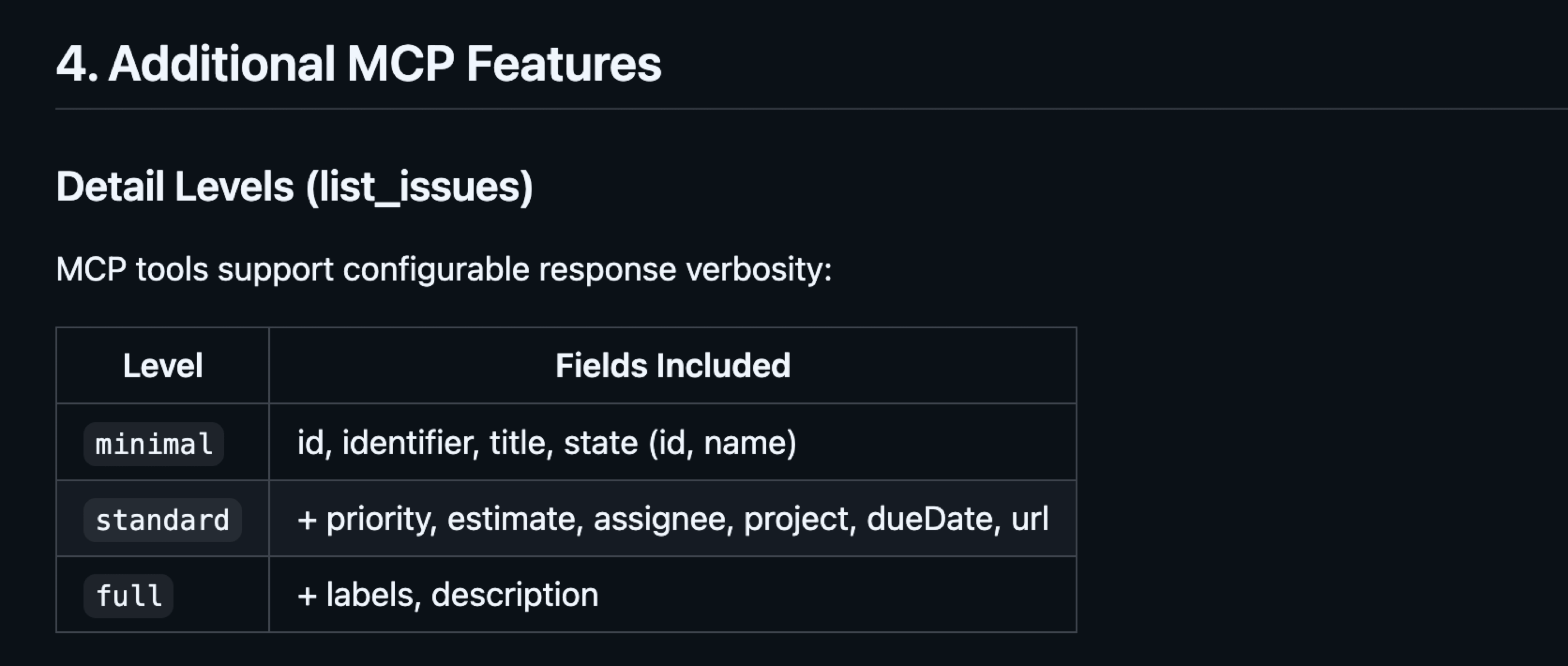
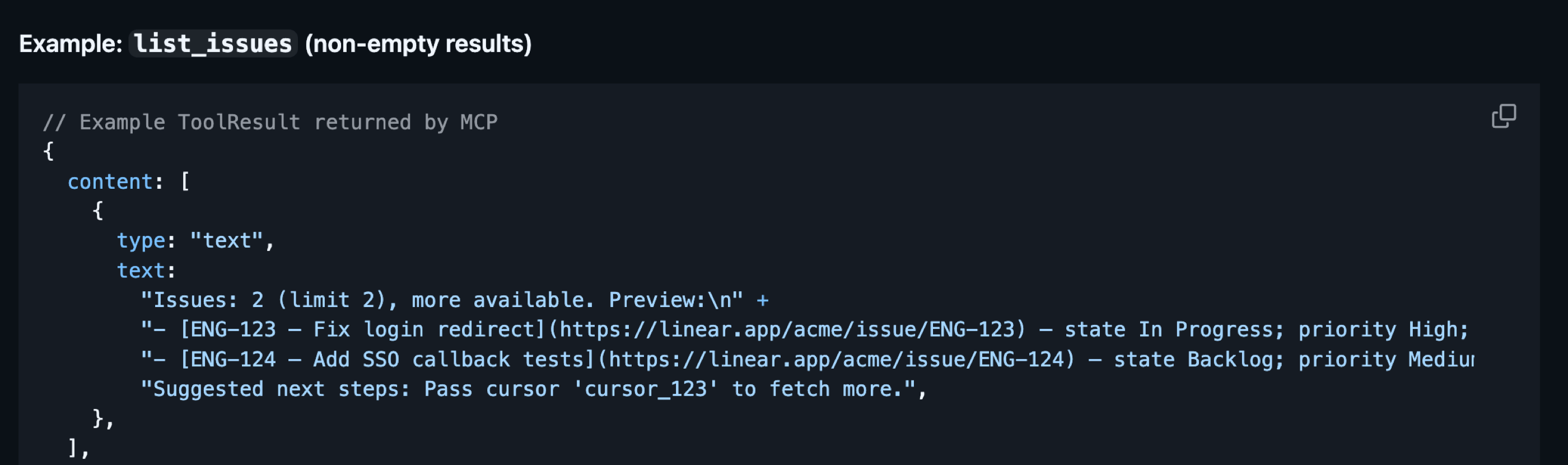
- Tool Search reduces the initial context size but does not address the fact that tools may return extensive results. If you work with various APIs, you know that we often receive the entire list of fields for a given entity because we can filter them out programmatically. However, when working with MCP Tools, we want to avoid returning more data than the model actually needs. It is helpful to let the model control the fields by either specifying them directly or using shorthands like
minimal/standard/full. As a result, the agent receives well-formatted, minimal information it can use for further work.
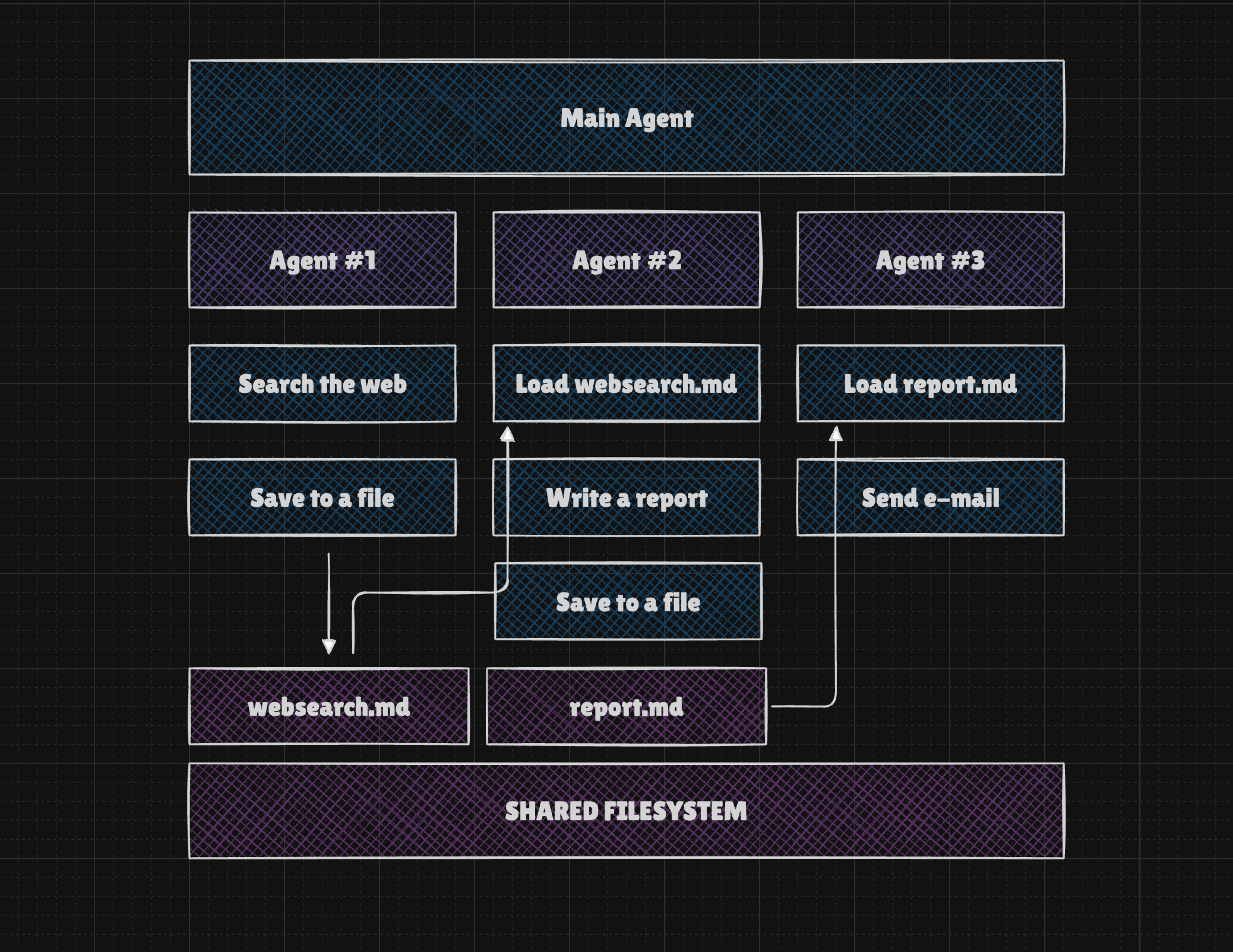
- In practice, there are tools and combinations that make it difficult to pass information between turns. For example, if we use tools for
searching the web,writing a report, andsending an email, we find that the first tool's result must be rewritten by an LLM for the second tool, and that tool's result rewritten again for the third. This makes our agent slow and expensive. Instead, we can use a filesystem so agents can save tool results and pass a file reference rather than rewriting data multiple times.
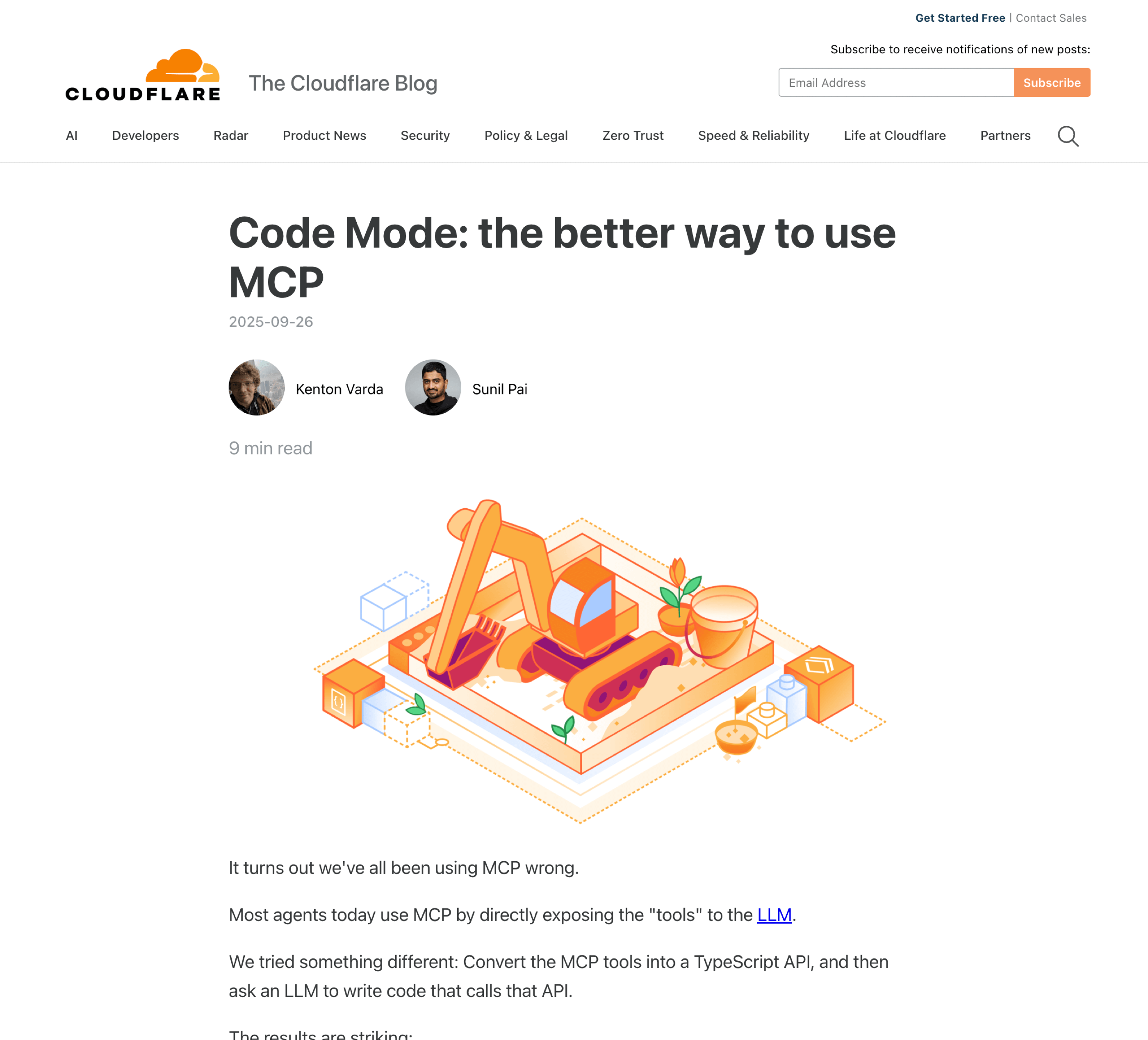
- In some cases, neither tool search nor controlling output formats effectively reduces the context used by the agent. Instead, we can adopt the approach suggested by the Cloudflare Team and later by Anthropic, which involves allowing the AI to write and execute code within a sandbox. This method can integrate filesystem access and tool search, enabling the agent to explore available tools. Consequently, the agent receives minimal tools upfront, such as
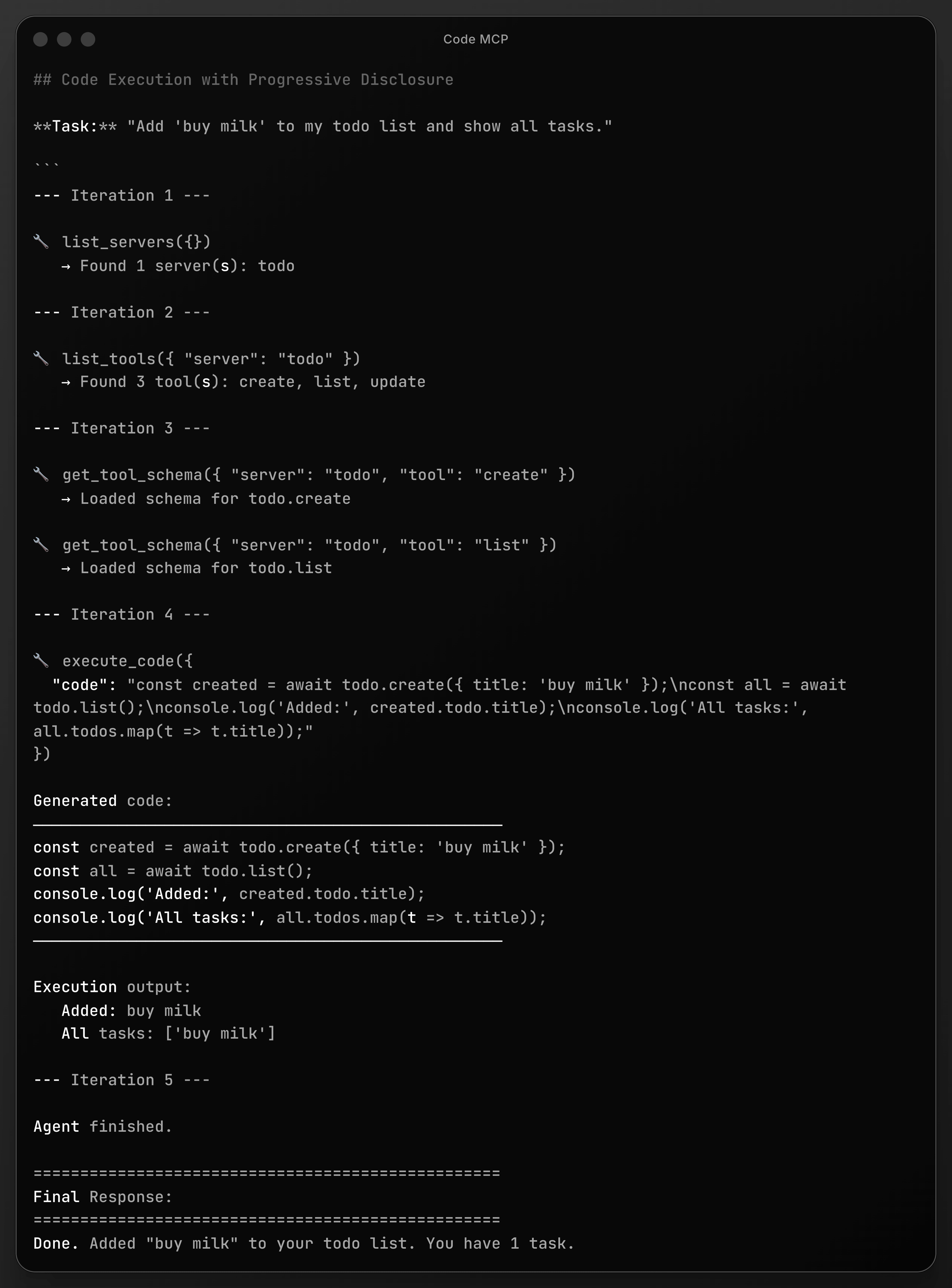
list_servers,list_tools,get_tool_schema, andexecute_code. Because current LLMs are highly proficient at writing code, this approach is incredibly flexible and useful, though it adds complexity regarding the need for sandboxes or services such as Daytona or E2B.
An example of Code MCP usage may look like the one below. A user asks to add a task to the list, so the agent first searches the MCP servers, then lists the tools, loads their schemas (or interface/signatures), and finally executes the code. You can find the source code for this example on my GitHub profile: https://github.com/iceener/mcp-agent-sandbox-demo
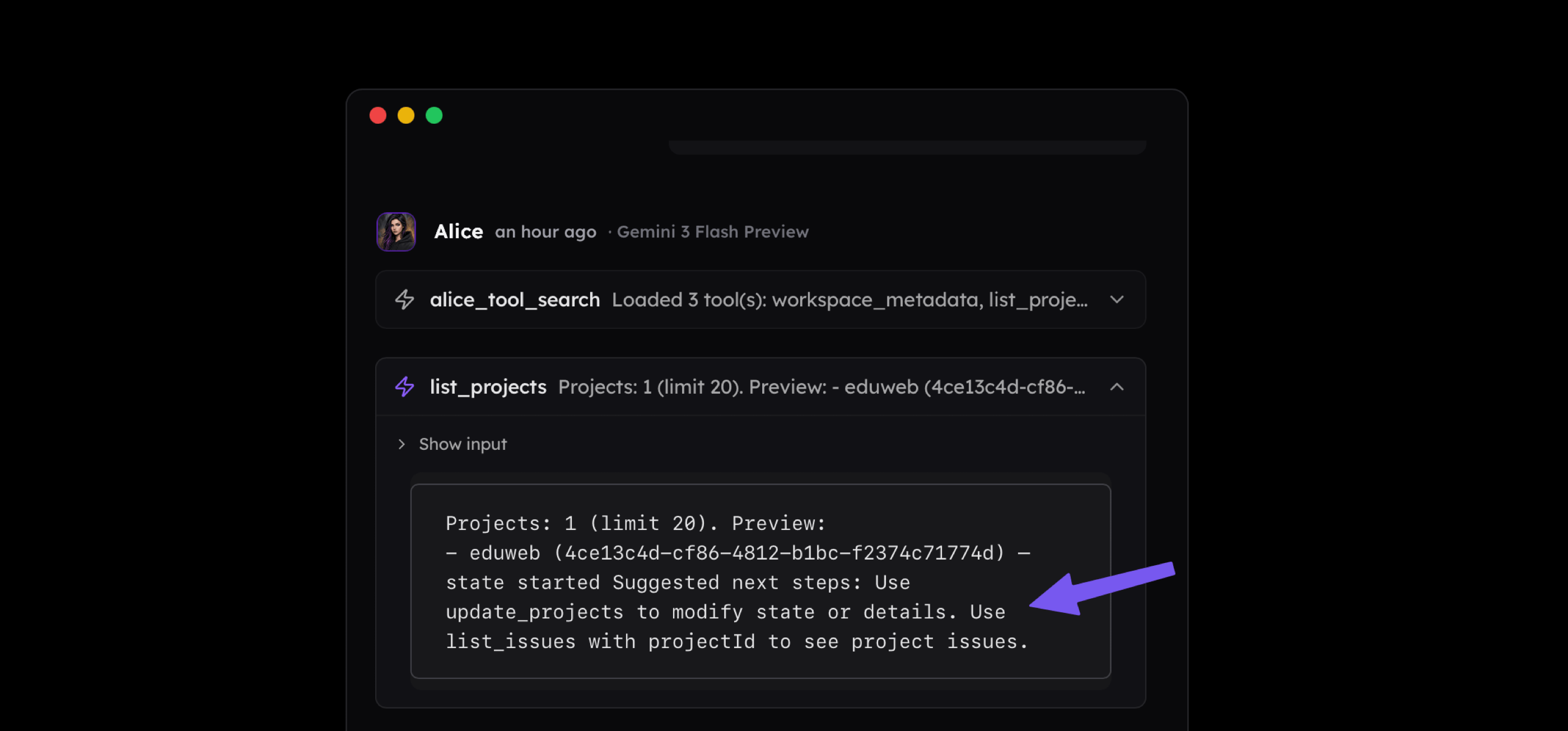
- Finally, we have one more extremely important tip for designing tools. Both success and error responses should contain not only the result data but also a helpful tip that the agent can use to understand the next steps. For example, in the Linear MCP, I designed the
list_projectstool to return its name and identifier along with a tip explaining that the ID can be used with another tool. We must be careful with such tips, however. If a suggested tool is not available to the agent, providing these hints may hinder performance rather than support it. The goal is simple here to reduce noise to signal ratio to the minimum.
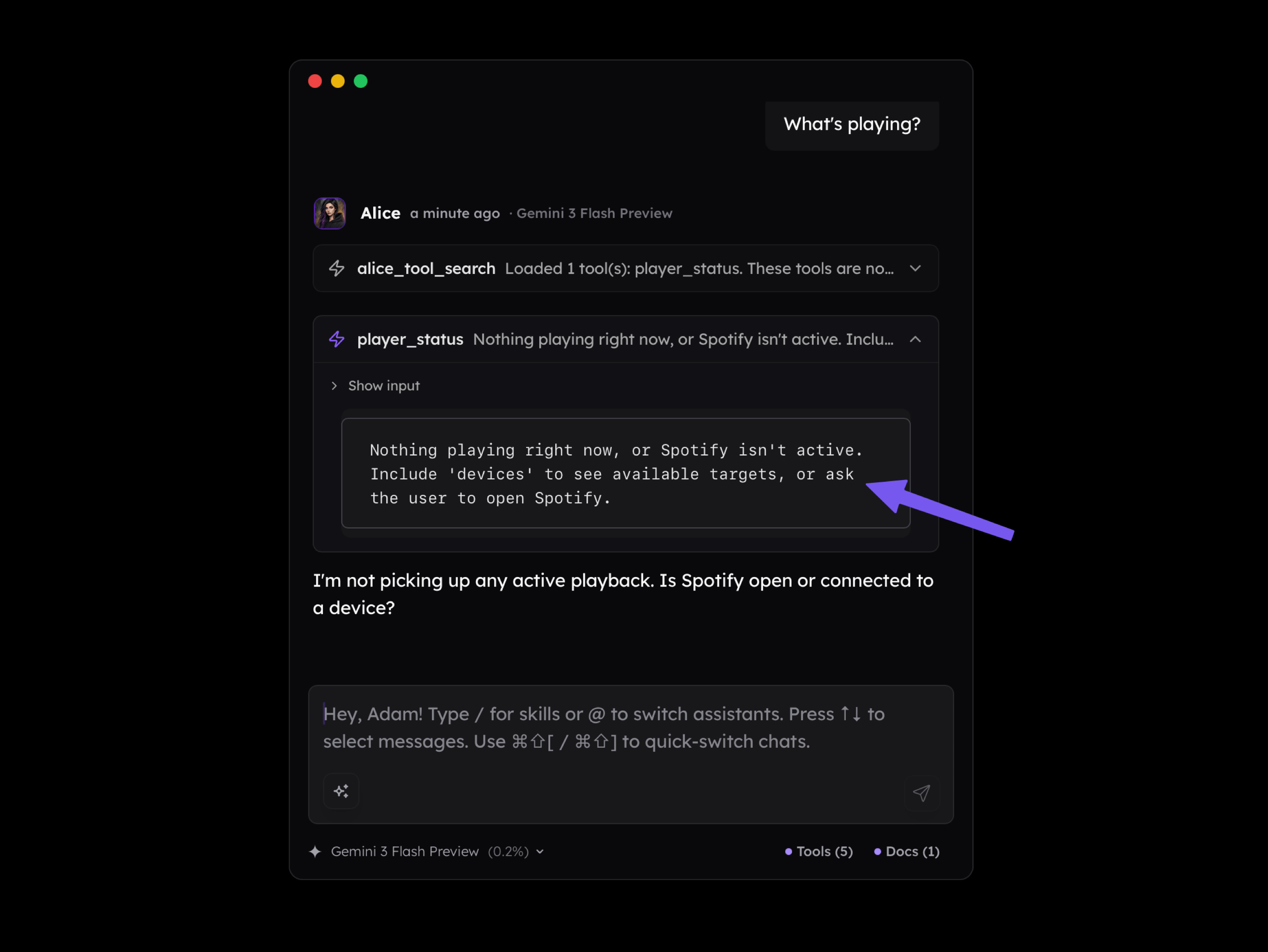
The same applies to error messages. Sometimes an error occurs not because the agent did something wrong, but because of an environmental limitation. In the scenario below, the agent is unable to connect with a service but receives clear feedback suggesting they contact the user.
Takeaways
Connecting Large Language Models with external apps, services, and devices and designing complex workflows or agentic logic is something all developers interested in Generative AI should look forward to. There's no doubt about that, and I personally experienced progress from text-davinci-002, which had something like a 4k context window, to what we have right now.
But despite this progress, there are no shortcuts, and if you want to really use these models to develop tools and systems that provide value, digging down and understanding core concepts is a must. Without them, you'll struggle with things that are either easy to manage or impossible to solve and should be addressed at the level of project requirements.
Before we finish I have a list of topics you may be interested in getting familiar with, so you will design better tools, MCPs (if you even still need to use them), workflows and agents.
- Core concepts: Tokens, Tokenization, Context Window, Knowledge Cutoff, Autoregression / Next Token Prediction, Transformer Architecture (in general), Embeddings and Latent Space, Decoding and Sampling (in general)
- Prompting: Zero Shot, Few Shot, Many Shot, Chain of Thought, Tree of Thought, Self Consistency, Meta Prompting
- Reasoning: Query Enrichment, Self-Querying, Speculative Reasoning, Intent Recognition, Routing
- Context Management: Compression, Contextual Retrieval, RAG, Agentic RAG, Hybrid Search, Reranking, Prompt Caching, Short-term Memory, Long-term Memory
- Workflows & Agents: Structured Outputs, Tool Use, Chains, Workflows, Agents, Multi Agents
Beside this, you'll need everything you already know about programming, and if you're a full-stack developer you're in a very good place because roughly 80% of the "generative apps" is typical app you work on everyday.
I think that would be all. I hope this article shed some light on the issues related to Function Calling and Model Context Protocol, but also that it gave you some perspective on Generative AI and use cases of language models and their role within application logic.